
Earlier this month, Nvidia sent shockwaves through the hardware community by announcing that RTX 50-series owners would soon gain access to an evolved version of Multi Frame Generation (MFG). This isn’t just a minor patch; it is a fundamental shift in how the GPU manages fluid motion, introducing a dynamic switching system and a staggering new 6x interpolation option. After getting a first glimpse of this tech at CES in January, I’ve finally brought it into the Digital Tech Explorer labs to see if the reality matches the hype.

To understand the leap we’re seeing, we have to look at the underlying software architecture. Standard DLSS MFG works by rendering two frames natively and storing them in VRAM. The AI-driven Tensor cores then interpolate a frame to slot between them. This is the 2x mode we’ve become accustomed to. However, the “Multi” in MFG signifies that the AI can now generate two frames (3x), three frames (4x), or—with this latest 2024 update—five interpolated frames for a massive 6x output.
| MFG Mode | Native Frames | AI Generated Frames | Total Multiplier |
|---|---|---|---|
| 2x Mode | 2 | 1 | 2.0x Output |
| 3x Mode | 2 | 2 | 3.0x Output |
| 4x Mode | 2 | 3 | 4.0x Output |
| 6x Mode | 2 | 5 | 6.0x Output |
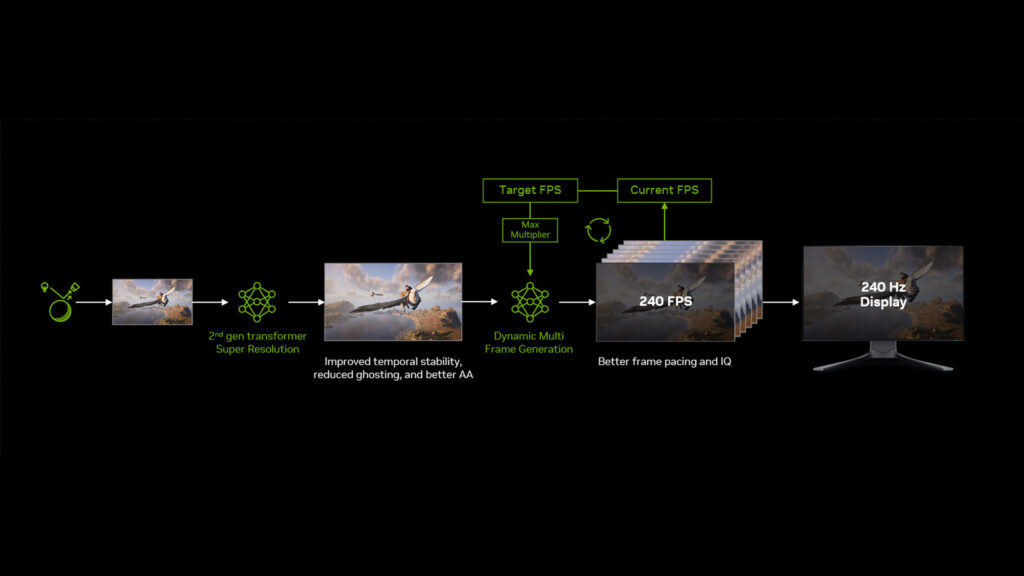
The real innovation here is “Dynamic” Multi Frame Generation (DMFG). Instead of locking your GPU to a specific multiplier, the system analyzes your monitor’s maximum refresh rate and real-time game performance. If you are sporting a high-refresh 4K display, DLSS will fluctuate between modes to keep you as close to that refresh ceiling as possible without sacrificing input stability.
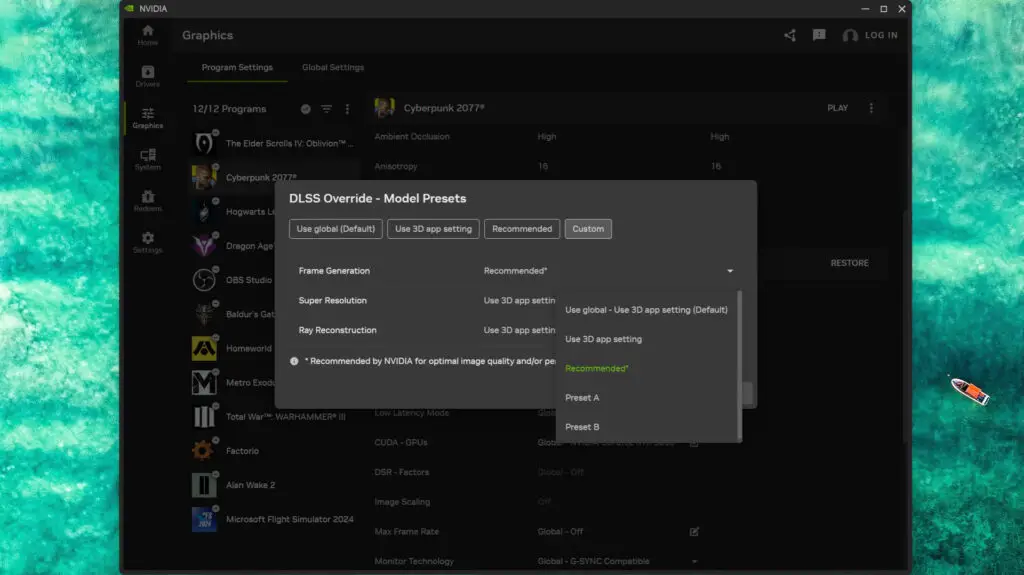
Furthermore, Nvidia has introduced “Preset B,” an updated machine learning model. This model is designed to solve the age-old “ghosting” issue on UI elements by leveraging depth buffer data from the game engine. While it currently only supports around 20 titles, including hits like Hogwarts Legacy and Dragon Age: The Veilguard, it represents a significant step in visual fidelity for AI-driven rendering.
To put these claims to the test, I configured our benchmark rig with the powerhouse AMD Ryzen 9 9950X3D and the flagship Nvidia GeForce RTX 5090, paired with an MSI MPG 321URX 240 Hz OLED monitor. Here is how the next generation of gaming performance looks in practice.
Cyberpunk 2077: The Path Tracing Torture Test
In our baseline 4K run with RT Overdrive enabled and no frame generation, the RTX 5090 hovered around 60 FPS. While playable, the lack of consistent frame pacing made the experience feel slightly “janky.” Enabling the native in-game 4x MFG smoothed the visuals considerably, but at a cost: input latency (PCL) spiked. Swapping the camera felt heavy, a common trade-off in PC gaming when using heavy interpolation.
Switching to Dynamic Multi Frame Generation changed the narrative. The system pushed the game into 5x mode for the majority of the run to chase that 240 Hz target. While the PCL rose to roughly 50ms, the visual fluidity was undeniable. Interestingly, forcing a 6x fixed override resulted in even higher frame rates but reintroduced some micro-stutters, likely due to the sheer volume of frames straining the pacing engine.
Dragon Age: The Veilguard: UI Clarity and Preset B
The Veilguard proved to be a different beast. Running natively at 4K Ultra, the game is well-optimized, but nowhere near 240 FPS. When enabling 2x frame generation, I witnessed something surprising: the system latency actually dropped. This is the magic of Nvidia Reflex. By synchronizing the CPU and GPU and eliminating the frame queue, the total “press-to-pixel” delay was improved despite the addition of AI frames.
As for Preset B? In my testing, the visual difference on the UI was negligible. Dragon Age already handles UI overlays cleanly, so the “Recommended” AI model didn’t offer a transformative experience here, but the performance stability remained rock solid.
Hogwarts Legacy: Managing Open-World Fluctuations
Hogwarts Legacy is notorious for its CPU-heavy transitions. Using the 9950X3D, we still saw frame rate dips when moving from the detailed interiors to the sprawling grounds. This is where DMFG truly shines. Instead of a jarring drop in smoothness, the system dynamically adjusted the generation multiplier. By staying in 2x or 3x mode during heavy GPU loads, it kept the latency lower than the fixed 4x mode, proving that “more” isn’t always “better” when it comes to player agency and control.
The Elder Scrolls 4: Oblivion Remastered: The Limits of AI
Even the best AI acceleration has its limits. In Oblivion Remastered, the inherent engine “jank” was too much for DMFG to mask. While the average frame rates skyrocketed into the hundreds, the 1% lows—those brief stutters that break immersion—remained low. It serves as a reminder that frame generation is a tool to enhance good performance, not a cure for a struggling game engine.
The Verdict: Is Dynamic MFG the Future?
Nvidia’s Dynamic Multi Frame Generation is a sophisticated piece of engineering. It successfully bridges the gap between raw performance and display capabilities, making the transition between different levels of AI interpolation virtually seamless. However, it isn’t a “magic wand” for lower-tier hardware. Attempting to run DMFG on an RTX 5070 at 4K with path tracing still resulted in a collapsed video stream; the hardware needs a baseline level of performance to feed the AI algorithm.
For the enthusiast with an 8K or high-refresh 4K setup, DMFG is a game-changer for cinematic, single-player experiences. It provides a level of smoothness that was previously unreachable. For the competitive gamer, the added latency will likely remain a dealbreaker, but for the rest of us, it’s a free performance “buff” that highlights the power of the 50-series architecture.
As we continue to explore the boundaries of digital innovation, tools like DMFG show that the future of gaming isn’t just about faster silicon—it’s about smarter software.
Disclaimer: All content on Digital Tech Explorer is for informational and entertainment purposes only. We do not provide financial or legal advice.
Affiliate Disclaimer: Some of the links on Digital Tech Explorer are affiliate links. This means we may earn a commission if you click through and make a purchase, at no additional cost to you. Our recommendations are based on thorough research and personal experience.