

At Digital Tech Explorer, we’ve tracked the rapid infusion of artificial intelligence into nearly every piece of software we use. While some embrace this shift, many users feel that AI is being forced into their workflows without consent. Mozilla, the developer behind Firefox, initially sparked concern with plans to transform into an “AI browser.” However, following significant community feedback, the company is pivoting toward a strategy of transparency and user agency.
Beyond its ambitious goal of building a ‘rebel alliance’ to challenge Big Tech’s dominance, Mozilla is introducing a granular AI controls section within the Firefox settings menu. This move aligns with our mission to help developers and enthusiasts maintain control over their digital environments.

Introducing AI Controls in Firefox 148
Scheduled for release on February 24, Firefox 148 will debut a dedicated interface to manage generative AI features. This isn’t just about hiding a sidebar; it’s a comprehensive toggle designed to block “current and future generative AI features” throughout the browsing experience.
According to the Mozilla Blog, the decision was a direct response to community sentiment: “We’ve heard from many who want nothing to do with AI. We’ve also heard from others who want AI tools that are genuinely useful. Listening to our community… led us to build AI controls.”
Customizing Your Browsing Experience
The new menu offers a granular approach to AI acceleration and integration. Users can pick and choose which features serve their needs or opt-out entirely with a single click. Below are the primary features manageable through the new AI settings:
| Feature | Description |
|---|---|
| AI Translations | On-device language translation for web pages. |
| PDF Alt Text | Automatic generation of descriptive text for images within PDFs. |
| Tab Grouping | AI-assisted organization of open tabs based on content. |
| Link Previews | Generative summaries of external links before you click. |
| Sidebar Chatbot | Direct access to third-party LLMs within the browser interface. |
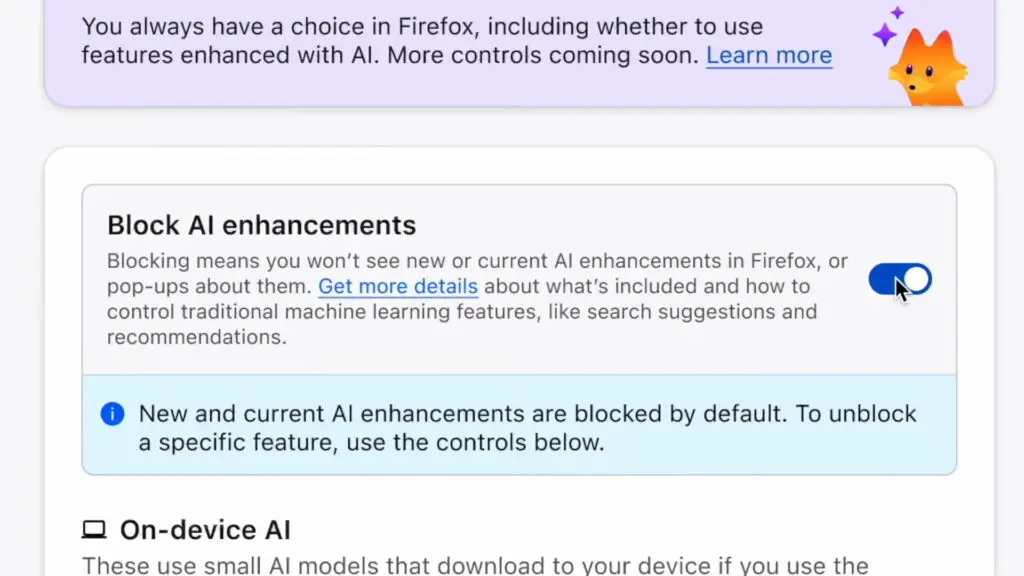
One of the most requested features is the “Block AI enhancements” toggle. Once enabled, Firefox will suppress pop-ups or reminders regarding AI capabilities. Importantly, your preferences remain persistent across browser updates, ensuring that a “New Feature” notification doesn’t disrupt your workflow after a routine patch.
Early Access via Firefox Nightly
As a long-time Firefox user and tech storyteller, I find this shift refreshing. While advanced users have long navigated the about:config panel to disable unwanted features, bringing these settings into a user-friendly UI is a massive win for accessibility. It respects the user’s intelligence and time.
If you are eager to test these controls before the stable release, they are currently available in the Firefox Nightly builds. As always with beta software, proceed with caution. At Digital Tech Explorer, we recommend testing these features in a separate profile to ensure your main browsing setup remains stable while you explore the future of Firefox’s “rebel” stance against unrequested AI.
For more insights on the latest hardware and software trends, stay tuned to our updates as we navigate the evolving landscape of 2024 and beyond.