
In the rapidly evolving landscape of gaming peripherals, finding a device that balances high-tier performance with a budget-friendly price tag often feels like a quest for a rare loot drop. However, the Mchose L7 Pro+ has emerged as a serious contender, offering an impressively lightweight build and competitive specs for just $60. At Digital Tech Explorer, we prioritize transparency and real-world testing, and this mouse certainly challenged our expectations of what a “budget” device can do.
Mchose is redefining market expectations by delivering a high-performing alternative to premium models like the $180 Logitech G Pro X2 Superstrike. For gamers looking to optimize their hardware without breaking the bank, this mouse represents a significant shift in value. While it has minor quirks—specifically in click release and battery longevity—its sophisticated software suite makes it a powerhouse for customizability.
Mchose L7 Pro+ Technical Specifications
| Feature | Details |
|---|---|
| Buttons | 5 (Plus underside DPI) |
| Connectivity | USB-C, Wireless 2.4 GHz, or Bluetooth |
| Sensor | PixArt PAW3395 |
| Switches | Omron or Kailh Black Green Dot optical |
| Max DPI | 26,000 |
| Weight | 43 g (measured) |
| Polling Rate | Up to 8,000 Hz |
| Price | $60 |
Design and Ergonomics
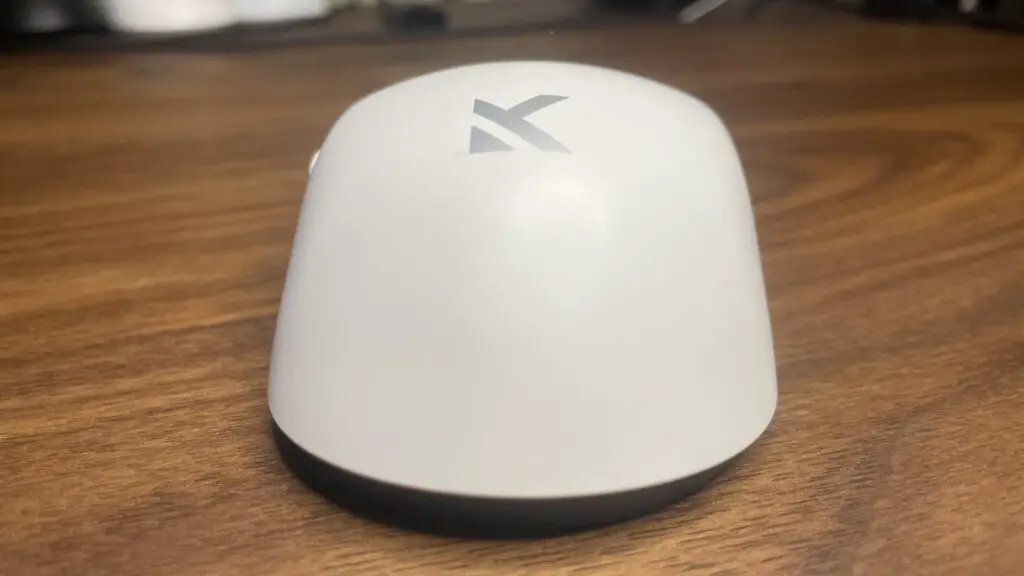
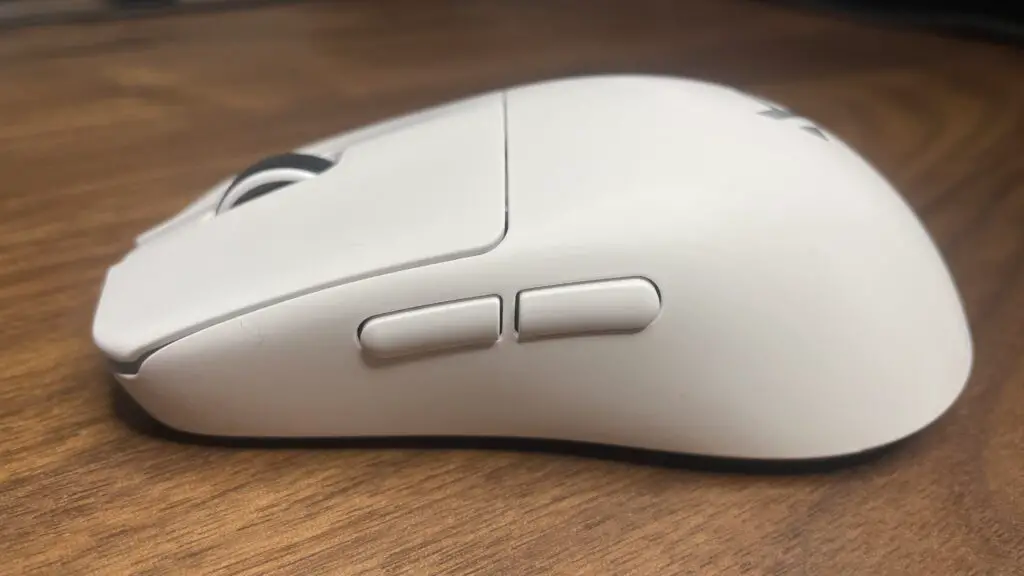
The silhouette of the L7 Pro+ will feel familiar to competitive enthusiasts, closely mirroring the shape of the Pulsar X2 CrazyLight. With a hump positioned toward the rear, it is tailor-made for claw grip users. This “Plus” iteration specifically caters to medium-to-large hand sizes, while the standard version offers a more compact fit for those with smaller hands.
While palm-grip purists might find the hump slightly more pronounced than on the Pulsar, the narrower chassis allows for a versatile range of hybrid grips. It strikes a balance between specialized ergonomic support and general usability, making it accessible for a wide variety of PC games.
Performance and Sensor Accuracy
In terms of raw tracking, the device performs exceptionally. During our tests at Digital Tech Explorer, we noted minor tracking variances in 2.4 GHz mode compared to a wired connection, but these were only visible in diagnostic software. In real-world gaming, the experience was flawlessly smooth.
The heart of this mouse is the PixArt PAW3395 sensor. While the newer PAW3950 is technically superior in specs like max DPI, the practical difference is negligible for most users. This sensor remains a gold standard for competitive play, ensuring every flick and micro-adjustment is registered with precision.
The true standout feature is the weight. At just 43g, it sits firmly in the ultralight category without relying on a “honeycomb” perforated shell. Impressively, Mchose managed to include a Bluetooth receiver and a physical DPI button—features that are often stripped away by competitors to save a few grams.
Build Quality and Gliding Experience
Despite the featherweight construction, the build feels robust. You might encounter a slight creak if you squeeze the sides with excessive force, but under normal gaming conditions, it feels solid and premium. The 100% PTFE feet provide a frictionless glide, particularly on speed-oriented pads like the SteelSeries QcK. We do recommend caution on glass surfaces, as PTFE tends to wear faster on those materials.
Button Tactility and Battery Life
If there is an area for refinement, it lies in the click mechanism. While the optical switches are reliable, the release feels a bit stiffer than some higher-end rivals. It’s a sensation you’ll likely adjust to within a few hours, though a lighter “snap back” would have been the icing on the cake.
Regarding power, battery life is the typical trade-off for such a light device. Expect roughly a week of usage at a 1 kHz polling rate. If you push the device to its 2 kHz or higher limits for competitive matches, you’ll be charging every few days. The included dongle features a smart LED indicator that shifts toward red as the battery drains, providing a helpful visual cue since the software only tracks battery life in 10% increments.
Software Customization
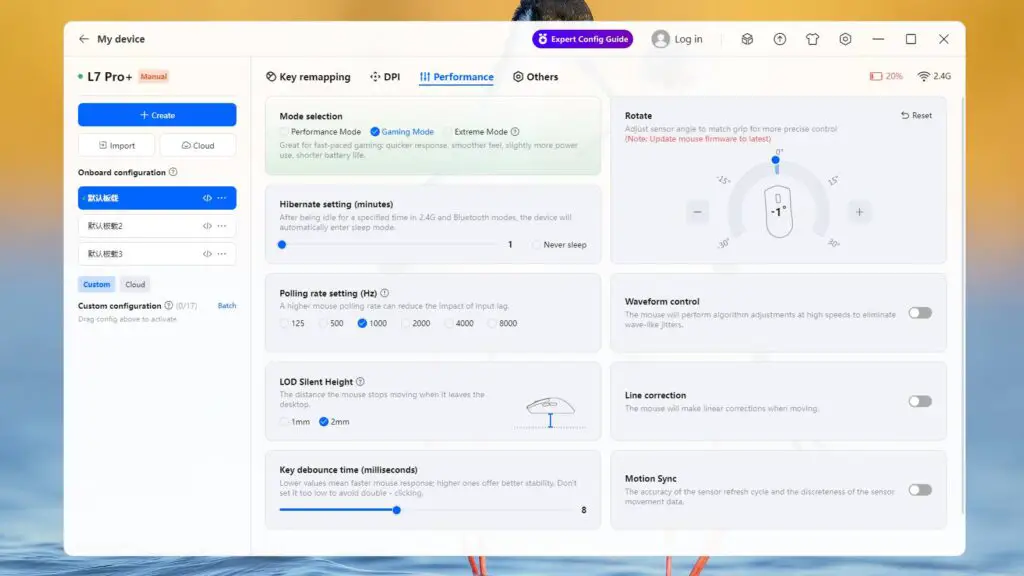
One of the most surprising aspects discovered during our review was the quality of the software. Mchose provides both a local installation and a browser-based interface, giving users flexibility in how they manage their settings. The Performance tab is a enthusiast’s dream, offering control over:
- Polling rates and debounce time
- Lift-off distance (LOD)
- Sensor tilt and scanning frame rates
- Specific “Extreme” modes for maximum sensor FPS
The Verdict: Exceptional Value
The Mchose L7 Pro+ is a masterclass in value. For $60, the minor concessions in click-feel and battery life are easily overshadowed by the top-tier sensor, ultralight weight, and professional-grade software. It’s a fantastic entry point for anyone looking to experience competitive-grade performance without the typical $150+ investment.
Should You Buy the Mchose L7 Pro+?
✅ Buy if…
- You want elite performance on a budget: This is arguably the best “bang-for-your-buck” ultralight on the market right now.
- You prefer claw or hybrid grips: The rear hump design is perfectly optimized for these styles.
❌ Don’t buy if…
- You are a strict palm gripper: The hump height and shape might feel restrictive for full palm contact.
- You want weeks of battery life: High-performance ultralights require more frequent charging intervals.
Disclaimer: This review is for informational purposes. Digital Tech Explorer may earn a commission through affiliate links included in this article at no additional cost to you. Our reviews are based on thorough research and real-world testing.