
For over four decades, Windows Notepad has stood as the quintessential, lightweight text editor for PC users. However, as Microsoft continues to evolve the software into a more robust tool, adding features like tabs, AI integration, and advanced formatting, the complexity has introduced new risks. Here at Digital Tech Explorer, we keep a close eye on these developments to ensure our community of developers and enthusiasts stays informed. Unfortunately, the latest expansion of Notepad’s capabilities has introduced a significant remote code execution (RCE) vulnerability that could allow attackers to compromise your system.
Understanding the Notepad Vulnerability: CVE-2026-20841
In a recent security update, Microsoft acknowledged a critical flaw tracked as CVE-2026-20841. This vulnerability carries a base CVSS score of 8.8, classifying it as a “high-severity” threat. As a storyteller in the tech space, I find it fascinating—and concerning—how a tool as simple as Notepad can become a gateway for sophisticated cybercrime.
| Vulnerability Metric | Details |
|---|---|
| CVE ID | CVE-2026-20841 |
| Base Score | 8.8 (High) |
| Vulnerability Type | Remote Code Execution (RCE) |
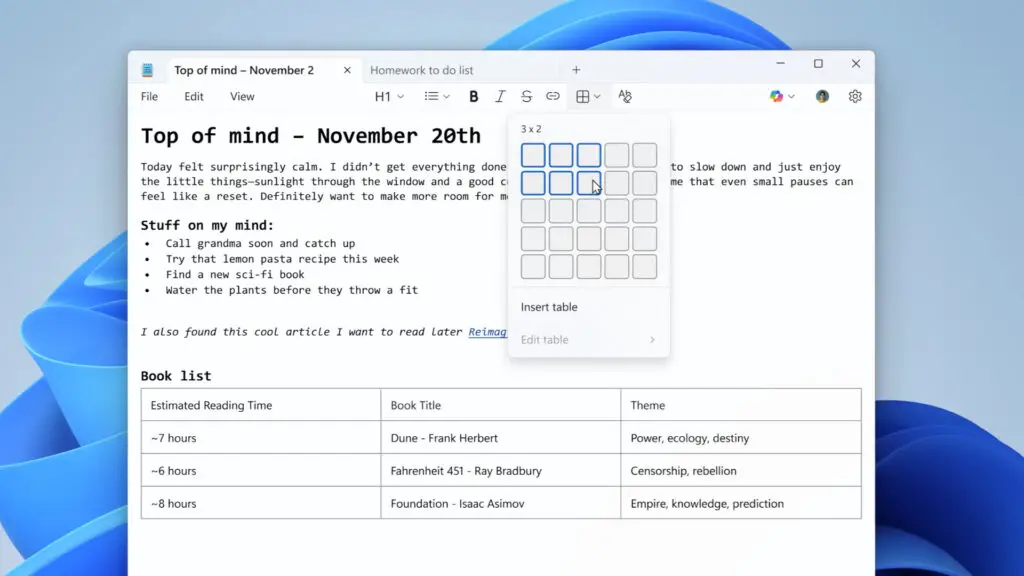
| Feature Affected | Markdown Rendering / Table Support |
| Privilege Escalation | Possible (Mirroring User Rights) |
The exploit functions through the manipulation of Markdown files. If a user opens a specially crafted Markdown file containing a malicious link, Notepad may inadvertently load and execute remote files. These files can be designed to scrape sensitive data or deploy malware. Most critically, if the user is operating with administrative rights, the attacker gains full control over the system, bypassing traditional hardware security layers.
How the Notepad Exploit Works
For this exploit to trigger, two conditions must be met: the computer must be connected to a network, and the user must manually click a link within a Markdown file. While this requires user interaction, the prevalence of social engineering in modern software attacks means the risk is far from negligible. At Digital Tech Explorer, we emphasize transparency and research-backed testing; our analysis suggests that the risk increases for those who frequently download community-made scripts or documentation.
If you are unfamiliar with Markdown, it is a popular markup language used by developers to convert plain text into structured HTML. Microsoft implemented Markdown support to allow Notepad to render tables and text formatting (such as bold or italics) without needing a full word processor. While this enhances usability for coding and web development, the way Notepad handles these external references is where the security gap lies.
Protecting Your System from Notepad Vulnerabilities
It is important to note that the issue does not reside within the Markdown language itself, but rather in how the Notepad application renders it. Microsoft is currently working on a patch, but until then, users must remain vigilant. To bridge the gap between complex tech and everyday safety, I recommend following these standard security protocols:
- Verify Sources: Only download .md or .txt files from trusted repositories or known contacts.
- Avoid Unfamiliar Links: Treat links within Notepad documents with the same suspicion you would an unsolicited email.
- Check for Updates: Regularly update Windows through the settings menu to ensure you receive the latest security definitions.
The silver lining is that there is currently no evidence of this vulnerability being exploited “in the wild.” However, given the simplicity of the attack vector, it serves as a reminder that even the most basic tools require rigorous testing as they incorporate more AI and connected features. Digital Tech Explorer will continue to monitor this story and provide updates as Microsoft rolls out definitive fixes. Stay tuned to our latest AI acceleration and software news to keep your digital environment secure.
Disclaimer: All content on Digital Tech Explorer is for informational and entertainment purposes only. We do not provide financial or legal advice. Some of the links on Digital Tech Explorer are affiliate links. This means we may earn a commission if you click through and make a purchase, at no additional cost to you. Our recommendations are based on thorough research and personal experience.