
At Digital Tech Explorer, we’ve spent years dissecting the mechanics of the most influential titles in the industry. After mastering the single-player nuances of climbing the Spire, the shift to Slay the Spire 2 multiplayer represents a massive evolution for the deckbuilding roguelite genre. While Mega Crit’s decision to add co-op was unexpected, seeing the system in action reveals a vision that prioritizes team synergy without sacrificing the strategic depth we’ve come to expect.
I’m TechTalesLeo, and I’ve been stress-testing these co-op runs to see how the new infrastructure handles the chaos of multiple players. The good news? Multiplayer isn’t an alien departure from the core loop; it’s an enhancement. If you’re ready to bridge the gap between solo play and squad tactics, here is everything you need to know about how the cooperative systems function in this 2024 release.

How to Start a Slay the Spire 2 Co-op Game
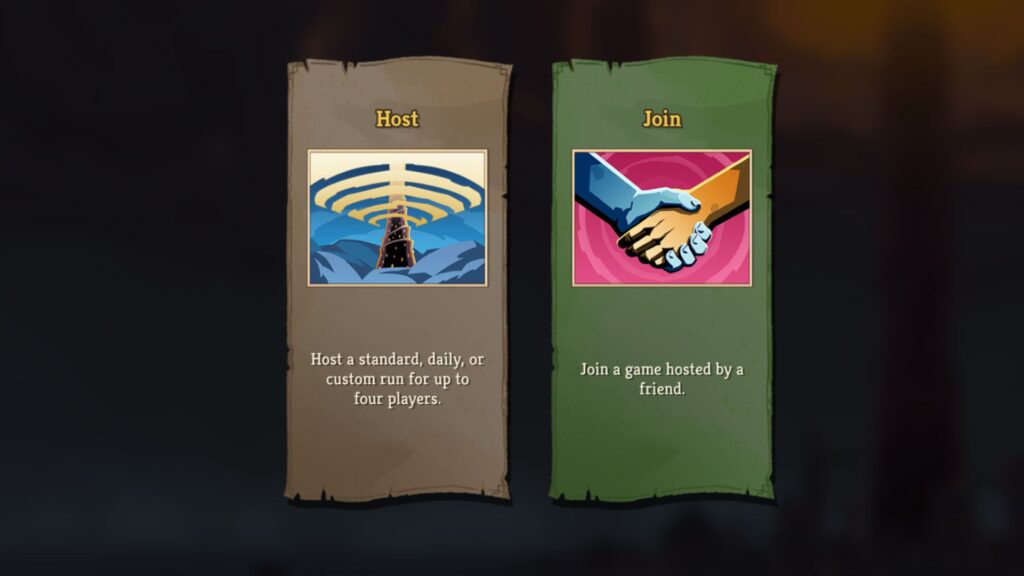
Initiating a Slay the Spire 2 co-op game requires one player to act as the Host. This player creates a dedicated multiplayer save file, allowing up to three additional players to join via the main menu. Currently, the system relies on Steam friends lists; there are no public matchmaking queues or password-protected lobbies for external players.
While we are currently in Early Access, it is important to note that local co-op is not yet supported. For those looking to jump in immediately, follow these steps:
- Launch the game and select a save profile where your preferred characters are unlocked.
- Navigate to Multiplayer in the main menu.
- The designated Host selects Host to initialize the lobby.
- Other players select Join and find the Host in their friends list.
- The party selects their characters (duplicate characters, such as multiple Silents, are permitted).
Managing Co-op Save Files
From a technical standpoint, save management in multiplayer is more rigid than in single-player modes. As a software-focused platform, we recommend understanding these limitations before committing to a long-term run:
| Feature | Rule/Limitation |
|---|---|
| Ownership | The Host owns the save file; it is tied strictly to their profile. |
| Capacity | Each of your three profiles can host exactly one campaign at a time. |
| Party Persistence | All players must be present at the start. You cannot add players mid-run. |
| Resuming Play | The full original party must be present to continue a saved run. |
| Unlocks | New profiles only have access to the Ironclad; other characters must be re-unlocked. |
Slay the Spire 2 Multiplayer Mechanics: Battle & Map
In Slay the Spire 2 multiplayer, your group functions as a single tactical unit moving through the Spire. While you share a path, your individual inventories—including cards, gold, and relics—remain distinct. This creates a fascinating balance of personal deckbuilding and collective strategy.
Combat and Energy Systems
- Scaling: Enemy HP and stats scale dynamically based on the number of players in the party.
- Attacks: Enemy offensive moves typically target the entire party, making defensive coordination vital.
- Turn Structure: Players have individual Energy pools and can play cards in any order during the party’s turn.
- Revival: If a player falls in battle, they are revived after the encounter, provided at least one teammate survives.
- Looting: Rewards like gold, cards, and relics are not shared; every player receives their own unique set of rewards.
Navigation and Events
- Pathfinding: The party must agree on a direction. If the vote is split, RNG determines the route.
- Ancients & Events: Narrative events allow players to make independent choices, often leading to different outcomes for each player.
- Campfires: A new Mend option allows you to restore 30% of an ally’s HP instead of your own.
- Shopping: The Shopkeeper generates a unique inventory for every player in the party.
- Treasure: Chests contain one reward per player. If two players desire the same item, the game uses RNG to assign it.
Understanding Multiplayer Ascension
For veterans of the gaming community, the Ascension grind is the true test of skill. In Slay the Spire 2, multiplayer Ascension progression is entirely independent of your single-player progress. To climb the ranks, you must successfully clear all three acts within a team of 2-4 players.
- Universal Unlocks: Unlocking an Ascension level in multiplayer applies to all characters within the multiplayer mode.
- The “Lowest Common Denominator” Rule: The lobby’s Ascension level is capped by the player with the lowest progress. If you wish to play at Ascension 4, every member of the party must have unlocked it.
- Group Flexibility: You can earn multiplayer Ascension levels with different groups of friends; the progress is tied to your account profile.

Staying ahead of the curve in Slay the Spire 2 requires a deep understanding of the new items being introduced. Explore our detailed breakdowns of the latest gear discovered in the Spire:
- Slay the Spire 2 Golden Compass: A vital tool for navigating the Spire’s shifting paths.
- Slay the Spire 2 Byrdonis Egg: A high-risk, high-reward relic that requires careful handling.
- Slay the Spire 2 Doormaker: Master the art of opening new tactical possibilities.
- Slay the Spire 2 Vantom: Enhance your evasion with this slippery new addition.
For more in-depth reviews and technical guides on the latest in software and coding, keep it locked to Digital Tech Explorer. Our mission is to ensure you have the data you need to dominate the leaderboard.