In the rapidly evolving world of GPU optimization, community-driven innovation often moves faster than official corporate roadmaps. Here at Digital Tech Explorer, we’ve been tracking how third-party developers bridge the gap between complex software and everyday usability. The latest breakthrough comes from OptiScaler, which has released a new test build (v0.9.0-pre10) that finally brings AI-drivenFSR 4 upscaling to Vulkan-based games.
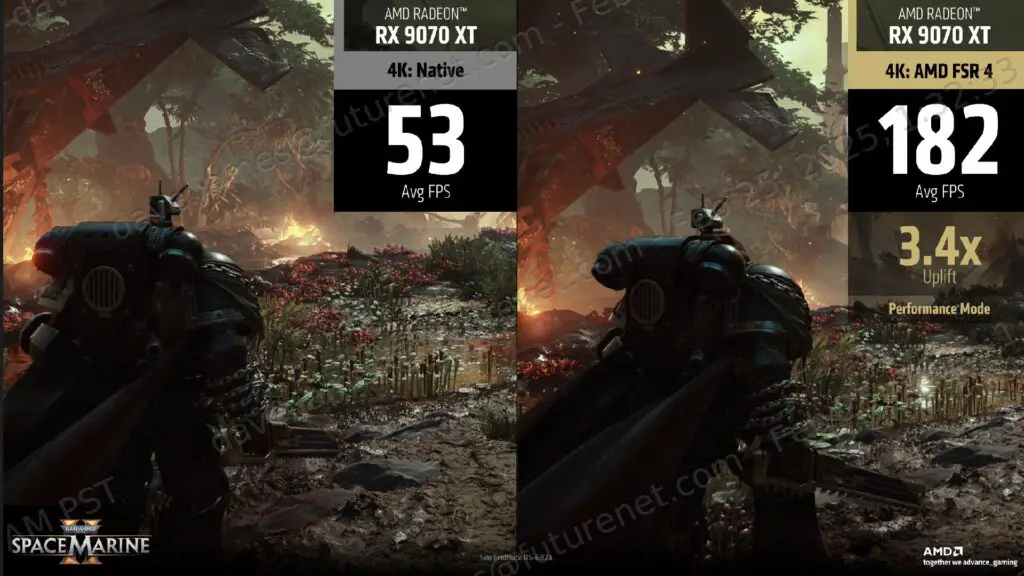
Visual comparison: AMD FSR 4 technology in action.
Bridging the Vulkan Gap for FSR 4
For many tech enthusiasts, the frustration with AMD has been the selective nature of their feature rollouts. While FSR 4 offers significant improvements in image quality by leveraging machine learning, its official implementation has been largely restricted to DirectX 12 titles.
OptiScaler circumvents these hardware and API limitations by processing upscaling instructions through a DX12 wrapper. This allows titles that run exclusively on the Vulkan API—which AMD’s official Adrenalin drivers typically overlook for these features—to benefit from the same high-fidelity upscaling previously reserved for the latest AAA PC games.
Feature Compatibility Overview
Feature
Official AMD Driver Support
OptiScaler v0.9.0-pre10
DirectX 12 Support
FSR 3.1 / FSR 4 (Select Titles)
FSR 2.1 & FSR 4
Vulkan API Support
Minimal / Legacy
Full FSR 4 Integration
Linux / Proton Compatibility
Standard Drivers
Supported via Proton/Mesa
Legacy GPU Support
Restricted to newer series
Broad Compatibility
Comparing official FSR support vs. community-driven OptiScaler enhancements.
Next-generation hardware requires flexible software solutions to reach full potential.
Why This Matters for Linux and Performance Enthusiasts
As a platform founded by a software engineer, Digital Tech Explorer values tools that provide transparency and control to the user. The cross-platform nature of Vulkan makes it the backbone of gaming on Linux. While OptiScaler isn’t a native Linux application, its ability to function through Proton and Mesa means that Steam Deck users and Linux enthusiasts can finally access FSR 4 in demanding titles like Doom Eternal.
Vulkan often provides a “closer-to-the-metal” performance boost compared to DX12, especially on older hardware. By adding FSR 4 to the mix, gamers can enjoy a dual benefit: the raw efficiency of the Vulkan API combined with the sophisticated image reconstruction of AMD’s latest AI models.
Empowering the Tech Community
The role of tools like OptiScaler remains indispensable as long as manufacturers prioritize new hardware sales over backward compatibility and API flexibility. FSR 4 represents a major leap forward, narrowing the visual gap between AMD and Nvidia’s DLSS. Through these community efforts, the “tech tales” we share aren’t just about what you can buy, but about how you can optimize the gear you already own.
For those looking to experiment, installing the tool typically requires moving specific DLL files into your game directory. As always, we recommend thorough research and backing up game files before modifying installation folders.