
In the fast-paced world of software development, precision and clarity are the benchmarks of great documentation. However, a recent incident involving tech giant Microsoft has sent ripples through the coding community, serving as a cautionary tale about the pitfalls of unchecked artificial intelligence. Here at Digital Tech Explorer, we prioritize transparency and thorough research, which is why the recent “AI slop” controversy on the Microsoft Learn portal caught our immediate attention.
Microsoft recently faced significant backlash for publishing an AI-generated, plagiarized flowchart on its official Microsoft Learn portal. The graphic, intended to explain the intricacies of AI-integrated workflows and GitHub version control, was a poorly reproduced version of a legendary diagram created over a decade ago by engineer Vincent Driessen.
The Original Blueprint: A Decade of Git Excellence
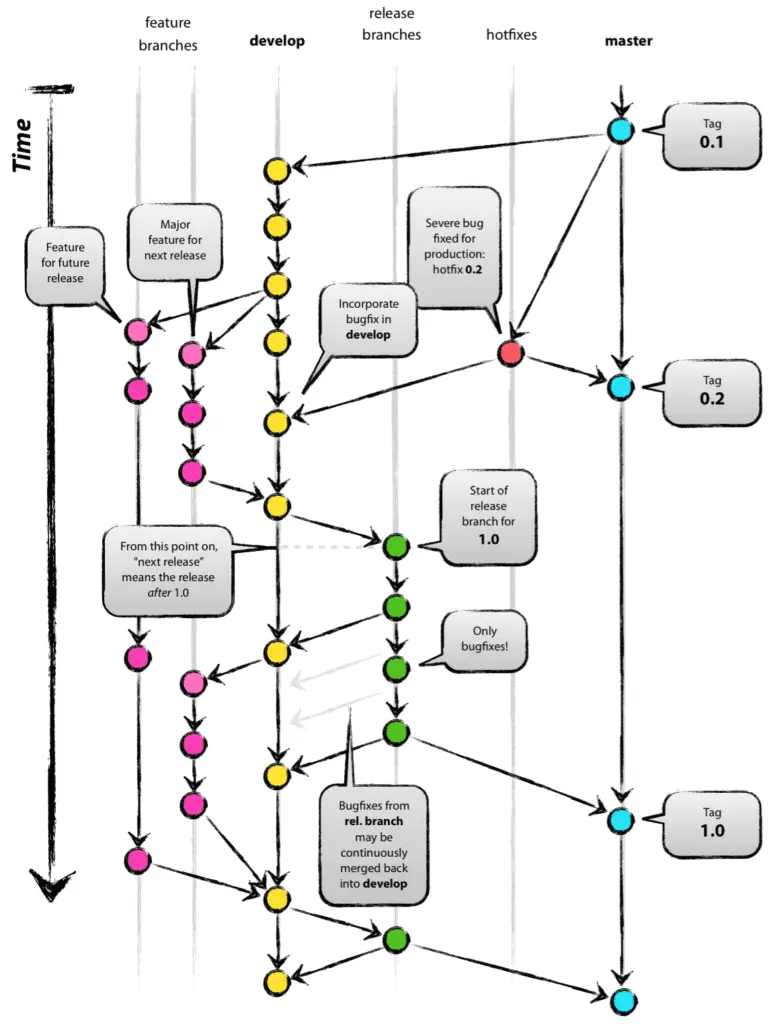
Back in 2010, Vincent Driessen authored “A successful Git branching model,” a piece of content that became a cornerstone for developers worldwide. To help visual learners, he designed a comprehensive diagram to represent his model. Driessen didn’t just “generate” this image; he meticulously crafted it in Apple Keynote, focusing on color theory, curves, and a logical layout to ensure developers could understand complex branch interactions at a glance.
Recognizing the value of his work to the broader software community, Driessen made the source files freely available. This gesture led to its widespread adoption in technical presentations, wikis, and educational videos. As Driessen noted, the goal was to share knowledge and let the internet embrace it. What he didn’t expect was for a trillion-dollar company to run his life’s work through an machine learning filter and publish the degraded result without credit.
The Anatomy of “AI Slop”
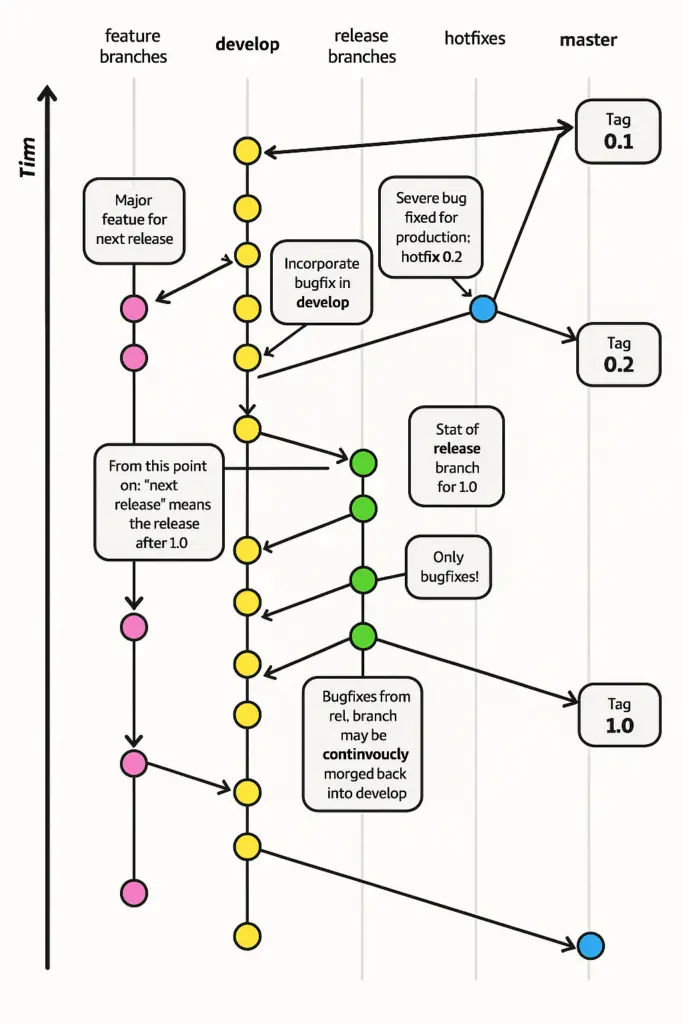
The chart featured on Microsoft Learn (which has since been scrubbed from the site) was undeniably a derivative of Driessen’s work. But instead of utilizing the high-quality source files Driessen provided for free, Microsoft appeared to use an AI image generator to “reimagine” the graphic. The result was what many in the industry are now calling “slop”—low-quality, AI-generated content that lacks human oversight.
The differences between the professional original and the AI-generated version are stark. Below is a breakdown of the errors that compromised the chart’s utility:
| Element | Original (Vincent Driessen) | Microsoft AI Version |
|---|---|---|
| Vertical Axis | Labeled clearly as “Time” | Erroneously rendered as “Tim” |
| Process Label | “Continuously merged” | Nonsensical “Continvuocly morged” |
| Feature Branches | Labeled as “Feature” | Misspelled as “Featue” |
| Visual Clarity | Subtle gray elements for readability | Stark, disjointed black lines |
Why This Matters for Developers
At Digital Tech Explorer, we believe technology should be educational and empowering. TechTalesLeo often discusses the importance of digital storytelling and innovation, but this incident highlights the dark side of that evolution. When a major player like Microsoft bypasses human review in favor of “generating content,” the quality of education for the next generation of developers suffers.
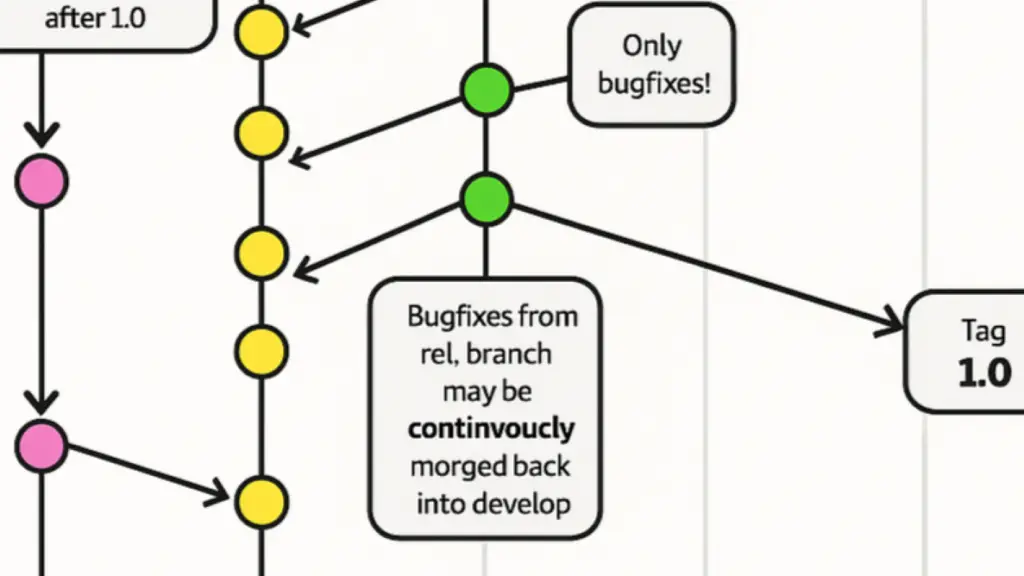
Driessen expressed profound disappointment, not in the use of his model, but in the “lack of process and care.” He noted that this wasn’t an instance of being inspired by a design to build something better; it was a case of taking something that worked and making it worse through “fingerprint washing” via AI.
Final Thoughts
While the image has been replaced on the Microsoft Learn tutorial page, the company has yet to provide a public acknowledgment of why the error occurred. For tech enthusiasts and professionals, this serves as a reminder to remain critical of the content we consume. AI is a powerful tool for AI acceleration, but it cannot replace the meticulous research and “real-world testing” that we value here at Digital Tech Explorer.
As we continue to track 2024 releases and emerging trends, we remain committed to bringing you stories that bridge the gap between complex code and everyday usability. For more insights into the evolving landscape of hardware and software, stay tuned to our latest updates.
Author’s Note: This article was reviewed for accuracy to ensure our community of developers stays ahead of the curve. For more stories on digital innovation, visit TechTalesLeo’s author page.