At Digital Tech Explorer, we specialize in dissecting the intersection of complex software design and user experience. While gaming in the vast world of Pywel is breathtaking, some of its systems can be as enigmatic as its lore. If you have been traversing the rugged landscapes of Crimson Desert and encountered a suspicious stranger who handed you a Lost Letter before vanishing, you likely found yourself staring at your inventory in confusion.
A mysterious figure hands the cryptic document over to Kliff.
As a seasoned storyteller and tech analyst, I, TechTalesLeo, have seen my fair share of UI hurdles. In Crimson Desert, the primary issue isn’t that you’ve lost the item; it’s the way the interface categorizes it. Your natural instinct is to scroll through your main pack, but the game hides these documents behind specific sub-layers.
Navigating the Crimson Desert Inventory UI
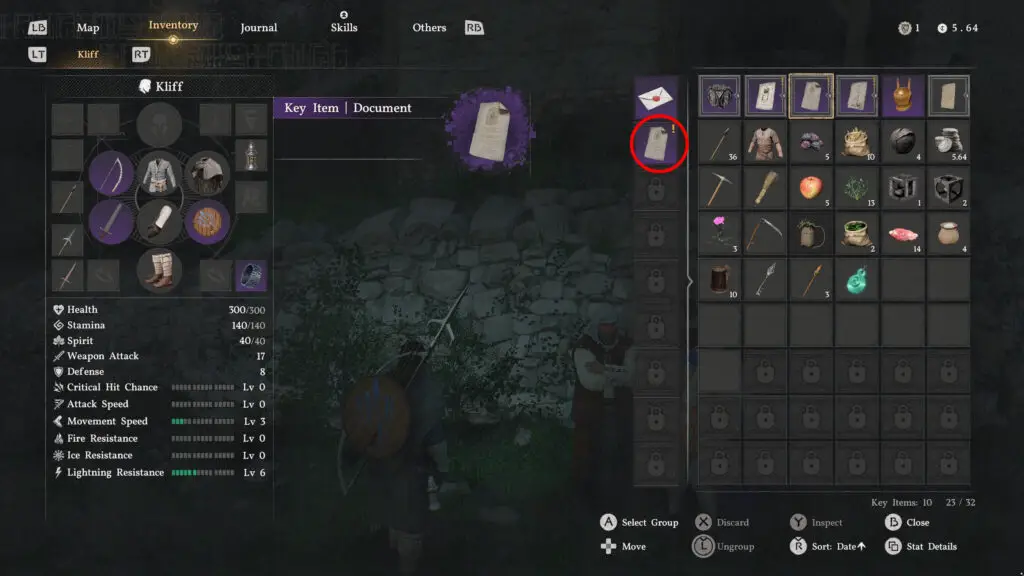
To locate the message, open your inventory and look for the row of purple ‘key items’ at the top. This section houses critical gear like the Visione, bounty posters, and Sealed Abyss Artifacts. However, these icons act as hidden categories rather than single slots.
Focus on the document category within the purple key items section.
To find the stranger’s message, you must select the ‘document’ category located between the standard posters and bounty listings. Once selected, a column will appear to the left of the main window displaying the Sealed Letter, the mysterious Lost Letter, and any other correspondence you’ve collected.
Key Item Categorization Overview
Item Type
Category Location
Typical Contents
Visione / Artifacts
Key Items (Main)
Story-critical gear and skill modifiers
Bounty Posters
Key Items (Sub-menu)
Target locations and rewards
Lost Letters
Documents (Sub-menu)
World-building and gameplay tutorials
Understanding the hierarchy of the Crimson Desert inventory system.
Deciphering the Message
Once you select the document and examine it, Kliff will translate the text. While the delivery feels like the start of a grand conspiracy, these notes often serve as immersive tutorials. For example, the initial letter typically explains stamina mechanics—a bit of a “tech support” moment for players who have already mastered the basics of survival.
Mastering this UI quirk early is essential. You will frequently use this process during main quests and when investigating items discovered in the wild. At Digital Tech Explorer, we believe that understanding the “how” behind a game’s interface is just as important as the “where” of its treasures.
Master the mechanics of Pywel with our specialized technical guides.Expand your knowledge of Pywel:
Character Progression: How to unlock every unique ally.
Skill Management: Swapping abilities via Faded Abyss Artifacts.
Thievery Mechanics: The technical side of pilfering loot.
Companion Systems: How to obtain and manage pets.
Equestrian Skills: Taming and leveling your mounts.
Traversal: Utilizing Mysterious Energy and Abyss Nexuses for fast travel.
Disclaimer: All content on Digital Tech Explorer is for informational and entertainment purposes only. Some links may be affiliate links, meaning we may earn a commission at no cost to you.