
As a PC gamer based in the UK, navigating the increasing wave of age verification checks feels like a constant hurdle to digital privacy. A recent example is the X alternative, BlueSky, which requires bank cards, official IDs, or facial verification just to access Direct Messages. On principle, I’ve often steered clear of these requirements, hoping platforms like Discord would remain a sanctuary for private communication. However, it seems that era is coming to an end.
At Digital Tech Explorer, we prioritize transparency and real-world testing. Recent updates from Discord indicate they will implement age checks for all users globally starting this March. While I previously avoided their experimental verification phases, the upcoming shift will default every user into a “teen-appropriate experience.” This change restricts access to age-gated servers and blurs “sensitive” content unless a user completes a formal age assurance process.
Discord claims they will use existing data to confirm age groups where possible and insists that facial scans stay on-device while IDs are deleted after verification. However, following reports of a breach last year that potentially exposed 70,000 ID photos, many in the gaming community remain skeptical. If you’re looking to maintain your privacy without sacrificing your social connectivity, it’s time to look at the alternatives.
Finding a tool that replicates Discord’s complex ecosystem is tough, but for those of us who just want to chat with our squad, there are several viable options. Here are three alternatives I’ve personally tested for performance and privacy.
TeamSpeak: The Veteran’s Choice
| Pros | Cons |
|---|---|
| Massive, free-to-join game-specific servers | Voice and text chats are kept separate |
| One-on-one screen sharing capabilities | New 6.0 Beta UI feels cluttered |
| Legacy support for TeamSpeak 3 | Server hosting for private groups requires a fee |
TeamSpeak remains a staple for hardcore PC gamers. It currently offers two versions: the classic TeamSpeak 3 and the modern 6.0 Beta. While the legacy version is incredibly lightweight, the new beta attempts a more “Discord-like” interface that feels somewhat unintuitive.
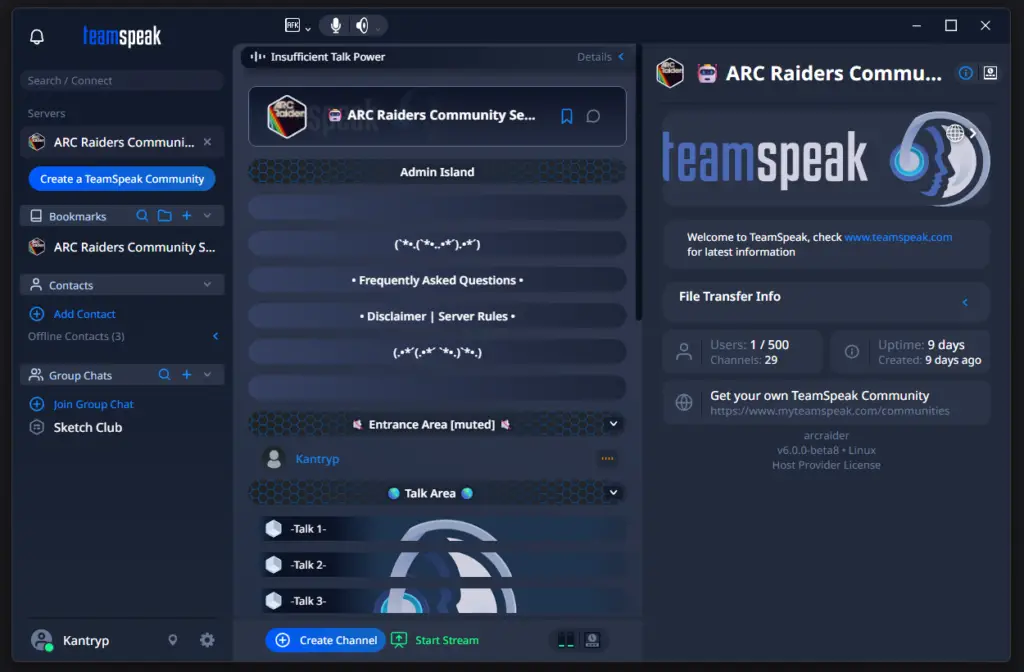
While basic accounts require minimal info, TeamSpeak’s privacy stance on age checks is currently vague. Furthermore, to host a private community server for more than a few friends, you’ll likely need to pay a subscription, which can cost upwards of $50 annually. It lacks integrated individual video calls, making it better suited for pure audio coordination rather than a full social hub.
GameVox: The Dedicated Contender
| Pros | Cons |
|---|---|
| Opus HD voice codec for high-fidelity audio | Video call performance is currently inconsistent |
| Interface is very similar to Discord | Strict text chat filters censor expletives |
| Temporary account option (no email required) | Beta version still has stability bugs |
If you want a UI that feels like home, GameVox is the closest match. Currently in open beta, it offers free servers for up to 50 users and supports gameplay streaming. The platform’s “no data mining, no ads” promise is a breath of fresh air for those weary of corporate tracking.
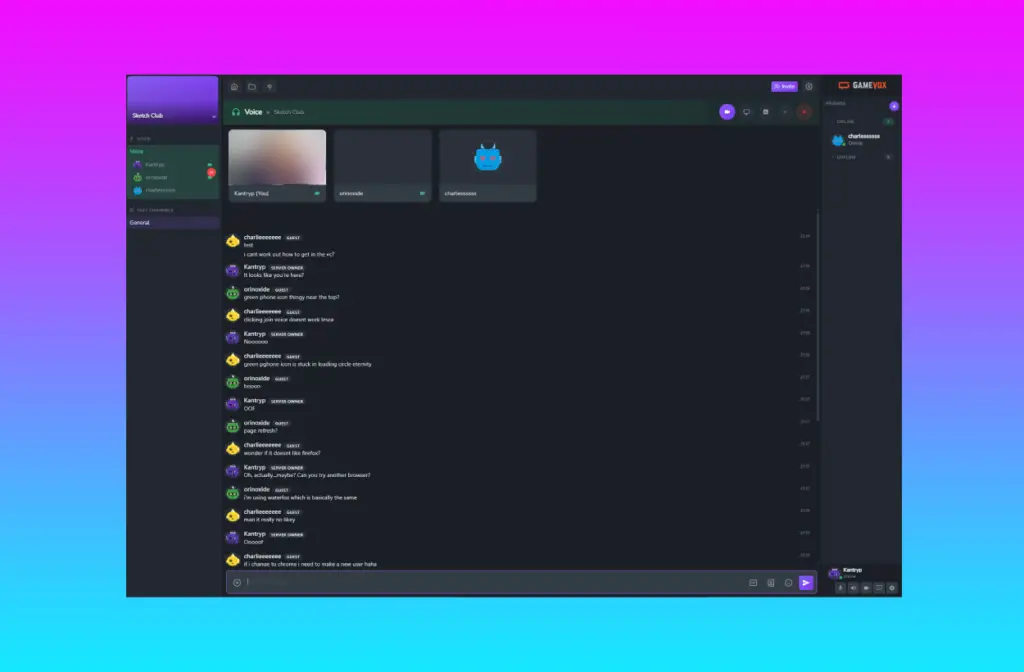
In my testing, the audio quality via the Opus HD codec was superb, but the video performance was hit-or-miss. One of my co-testers couldn’t get their feed to appear at all, which is a common hurdle in beta software. Additionally, the mandatory text filter is a bit overzealous, asterisking out even common gaming banter.
Signal: The Privacy Powerhouse
| Pros | Cons |
|---|---|
| Industry-standard end-to-end encryption | Requires a phone number for registration |
| Completely free with no ads or AI tracking | No native gameplay streaming features |
| Reliable group video and voice calls | Designed for messaging, not server-based communities |
Though not built specifically for gaming, Signal has become my top recommendation for small groups. It is donation-supported and provides end-to-end encryption for every interaction. Unlike WhatsApp, it isn’t owned by a tech giant looking to monetize your data via AI acceleration or targeted ads.
Signal’s biggest drawback for gamers is the lack of screen sharing or dedicated “server” structures. However, for sheer reliability and privacy, it is unmatched. During my tests, it even blocked Windows 11’s snipping tool from capturing the app window, showcasing its commitment to security.
The Final Verdict
If your priority is a secure, lag-free experience for voice and video calls with your regular group, Signal is the winner. It avoids the “enshittification” that plagues many social platforms today. For those who need the community-building tools of Discord without the invasive checks, GameVox shows great promise once it leaves beta.
For the more technically inclined, there are creative ways to stay on Discord, such as using open-source tools on GitHub to bypass certain verification prompts. However, as we always advocate here at Digital Tech Explorer, the best way to protect your digital footprint is to move to platforms that respect your privacy by design. If all else fails, there’s always the decentralized world of IRC—a classic that never truly went out of style.
Note: All tech reviews are based on real-world testing and our commitment to providing unbiased insights for developers and enthusiasts. Some links may be affiliate links, helping us keep the lights on at no extra cost to you.