
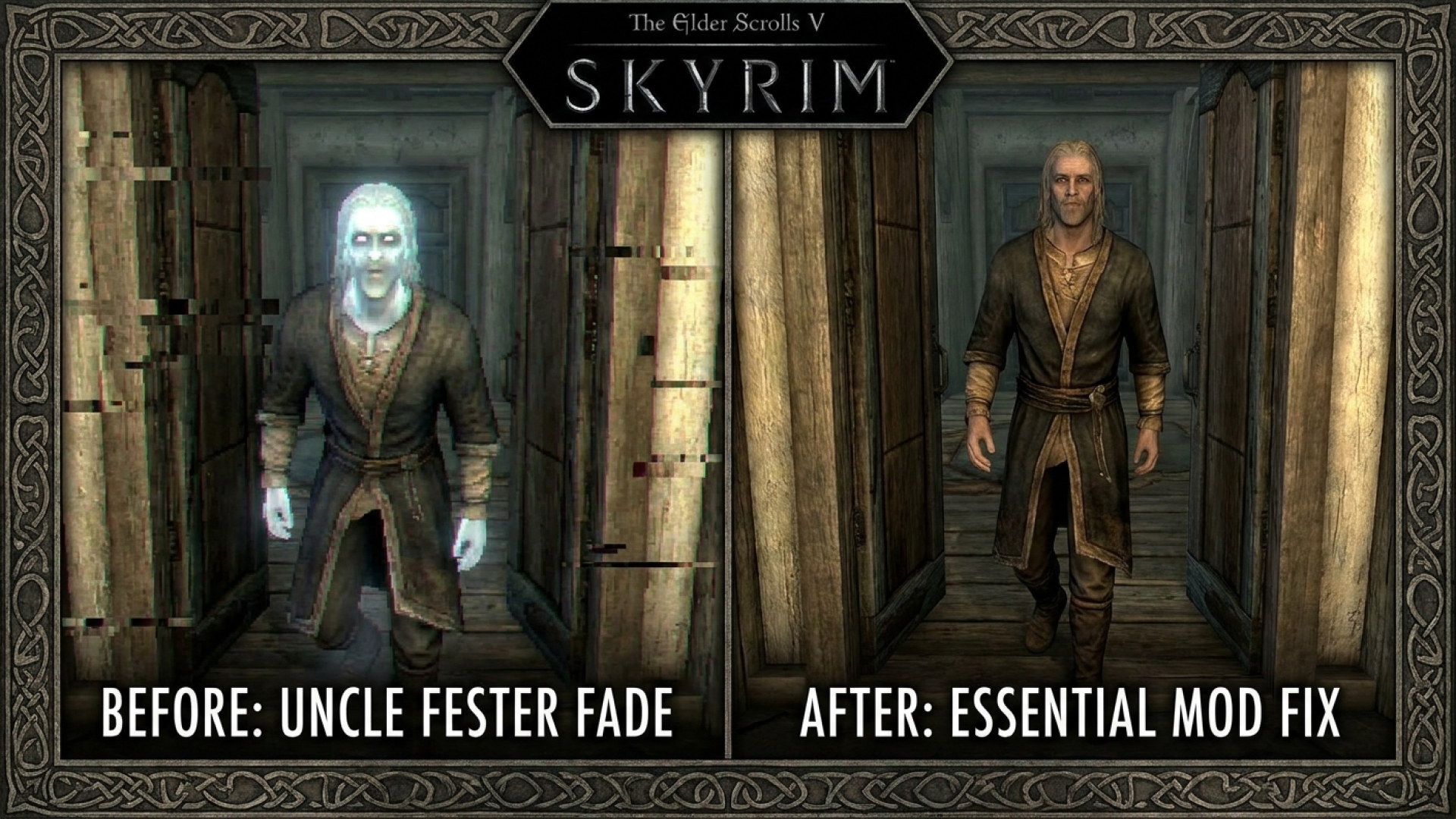
For over a decade, players of The Elder Scrolls V: Skyrim have navigated the vast landscapes of Tamriel, often overlooking the peculiar visual glitches that have become part of the game’s charm—or frustration. One of the most jarring immersion-breakers occurs during a mundane action: NPCs opening doors. At Digital Tech Explorer, we love diving into the technical nuances of game engines, and this specific “engine quirk” is a classic example of how hardware limitations of the past continue to haunt modern playthroughs.
When an NPC transitions through a load screen, the engine struggles to animate the full sequence. Instead of a fluid motion, characters crack the door open just a sliver before abruptly fading into the void. While seasoned players might have grown “blind” to this, the visual inconsistency remains a hurdle for those seeking a truly seamless 3D gaming experience.
The Technical Flaw: Why Skyrim NPCs “Glow” Before Vanishing
The Skyrim NPC door animation isn’t just clunky; it’s technically flawed. As our resident tech storyteller TechTalesLeo often notes, the “fade out” moment is where the engine’s age really shows. Just before vanishing, NPCs frequently light up unnaturally, losing all shadow depth. This “electrified” glow happens because transparencies fail during the fade sequence, causing hair, eyebrows, and skin textures to display strange artifacts.
Previously, modders attempted to fix this by simply deleting the animation entirely using tools like the Get On With It mod. However, that felt more like a band-aid than a solution for enthusiasts who value digital innovation and immersion.
The Essential Fix: No Load Door NPC Fade Mod
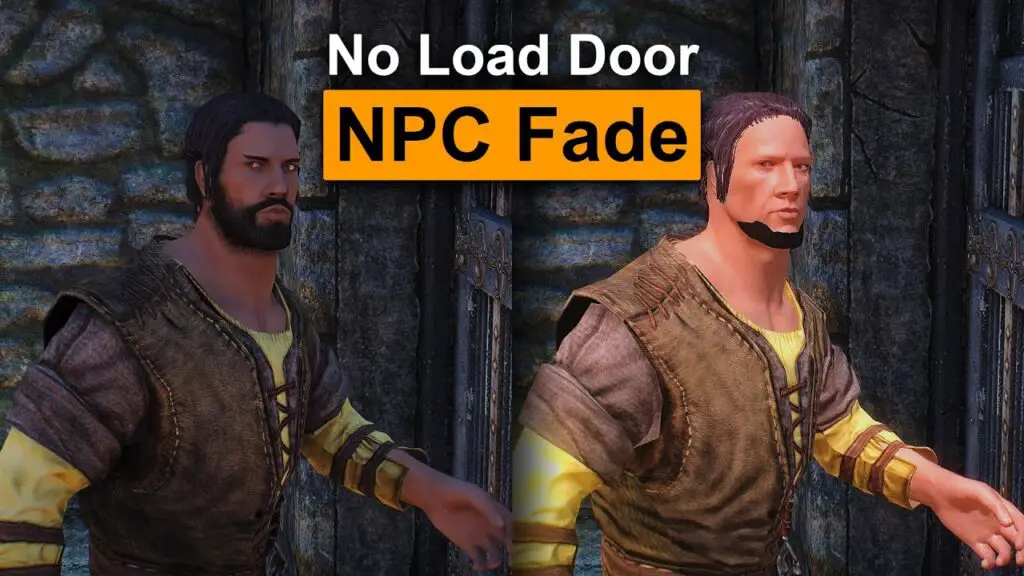
Thanks to the prolific modder wSkeever, this long-standing visual flaw has finally been addressed. The No Load Door NPC Fade mod is a masterclass in efficient coding. Coming in at a tiny one kilobyte, this mod eliminates the distracting lighting and transparency issues, ensuring NPCs maintain their visual integrity until the very moment they transition.
For those building a stable load order in 2024, this is an essential Skyrim mod. It reflects the kind of thorough research and real-world testing we champion here at Digital Tech Explorer.
| Feature | Original Game State | With No Load Door NPC Fade |
|---|---|---|
| Lighting | Unnatural “glow” during fade-out | Consistent environment lighting |
| Transparency | Hair and textures become opaque/glitched | Visual assets remain stable |
| File Size | N/A | 1 KB (Ultra-lightweight) |
| Immersion | Low (Jarring transitions) | High (Seamless NPC movement) |
Enhance Your Build: More Must-Have Mods from wSkeever
If you are looking to further refine your PC gaming experience, wSkeever’s portfolio offers several other high-quality enhancements that align with our mission to help developers and enthusiasts stay ahead of 2024 trends:
- Lock Add-Ons: A deep dive into mechanical interactivity, improving how locks function within the game engine.
- Dynamic Things Alternative: Transforms static environment objects into interactive elements, pushing the limits of the game’s hardware utilization.
- Belethor’s Sister Questmod: A creative narrative expansion for those who enjoy the storytelling aspect of RPGs.
- Weeping Angels Mod: A crossover that introduces the terrifying Doctor Who creatures into the Elder Scrolls universe.
Mastering the Bethesda Universe
At Digital Tech Explorer, we believe that understanding the tools behind the game is just as important as playing it. Beyond graphical fixes, mastering console commands can provide a “developer’s view” of how these complex worlds are constructed. Whether you are on Skyrim or the wasteland, these resources are invaluable:
- Power up your wasteland experience with Fallout 4 cheats and console commands.
- Navigate the Mojave using New Vegas console commands.
- Explore the secrets of Cyrodiil with Oblivion console commands.
- Customize your journey through the Skyrim Anniversary Edition with dedicated command guides.
Disclaimer: All content on Digital Tech Explorer is for informational and entertainment purposes only. While we focus on transparency and real-world testing, always back up your save files before installing new mods. Some links on our site are affiliate links, and we may earn a commission at no additional cost to you.