
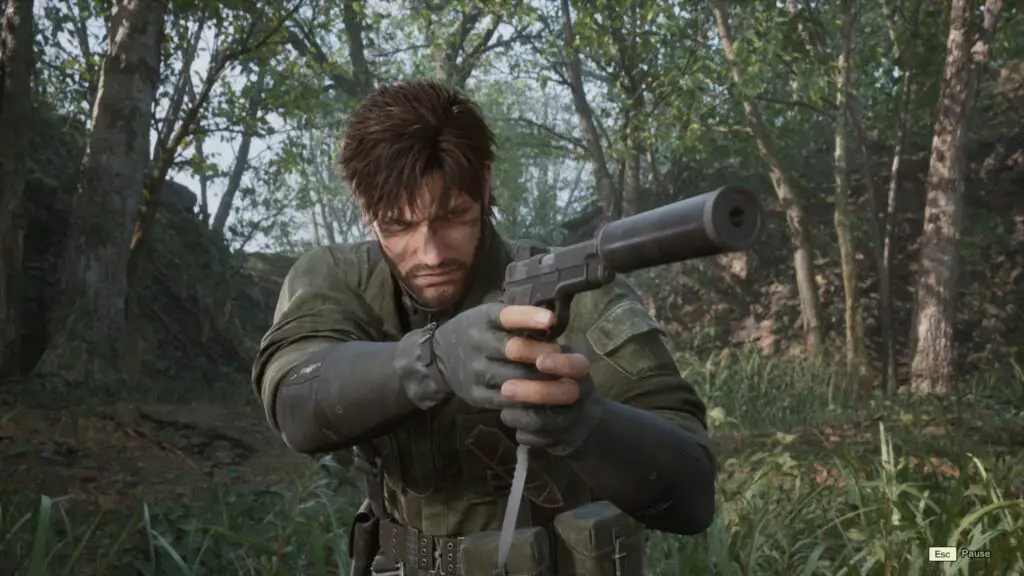
Here at Digital Tech Explorer, we’re always looking for ways to enhance your gaming experience and delve into the technical depths of new releases. The highly anticipated Metal Gear Solid Delta: Snake Eater, a faithful remake of the legendary MGS 3: Snake Eater, has recently landed on PC and consoles. True to form for the vibrant modding community, enthusiasts are already diving deep into its mechanics. Built on Unreal Engine 5, the game natively employs the engine’s standard software-based ray tracing Lumen algorithm and notably lacks official support for frame generation. Yet, our exploration reveals that activating these advanced graphical features is surprisingly straightforward, requiring just a few lines of code in a configuration file.
Guide to Enabling Hardware Ray Tracing and Frame Generation
Unreal Engine 5 offers two distinct modes for its powerful Lumen global illumination system: software and hardware. The software option, a less demanding solution, doesn’t require specialized RT hardware, striking a balance between visual fidelity and performance. In contrast, the hardware mode leverages dedicated ray tracing components and driver support from GPUs like AMD’s RX 6000-series, Intel’s Arc series, and Nvidia’s RTX 20-series or newer. While hardware Lumen delivers superior ray tracing quality, its performance cost often necessitates pairing it with upscaling technologies and frame generation to maintain smooth framerates.
To enable these cutting-edge features, navigate to the following directory on your PC:
C:\Users\[...]\AppData\Local\MGSDelta\Saved\Config\WindowsLocate and open the file named engine.ini using a text editor such as Notepad. Append the following lines of text to the very end of the file:
[SystemSettings]
r.Lumen.HardwareRayTracing=1
r.Lumen.Reflections.HardwareRayTracing=1
r.Lumen.ScreenProbeGather.HardwareRayTracing=1
r.LumenScene.DirectLighting.HardwareRayTracing=1
r.NGX.DLSS.denoisermode=1
r.Streamline.DLSSG.Enable=1
t.Streamline.Reflex.Enable=1
t.Streamline.Reflex.Mode=1
Here’s a breakdown of what each line accomplishes: The first four lines activate hardware Lumen for ray tracing, the fifth enables Nvidia’s Ray Reconstruction, and the final three are crucial for enabling DLSS Frame Generation along with Nvidia Reflex. While the in-game graphics menu remains basic and won’t display these new options, our thorough testing confirms their activation.
Assessing Visual and Performance Impact
Upon applying these tweaks, we observed that while hardware Lumen is indeed enabled, the visual difference in the game’s initial areas is quite subtle. What truly stands out is the significant performance boost delivered by frame generation. During our rigorous testing here at Digital Tech Explorer, using a high-end rig equipped with a GeForce RTX 5090, an Intel Core Ultra 9 285K, and 48 GB DDR5-8400 memory, the framerate jump was immediately apparent. Although this manual method doesn’t offer granular control over frame generation levels, the default enhancement is substantial enough to significantly improve the experience for most players.
Integrating Hardware Enhancements with the FPS Unlock Mod
For those looking to fully unleash Metal Gear Solid Delta’s potential, especially with frame generation, addressing the default 60 FPS cap on PC is essential. We highly recommend first installing the Better Uncap FPS v1.4 mod from Nexus Mods. This crucial mod introduces its own engine.ini file, which will replace any previous modifications you might have made to your game’s configuration.
Once the FPS mod is installed, you’ll need to locate and open its newly created engine.ini file. To combine our recommended hardware ray tracing and Ray Reconstruction tweaks with the mod’s FPS unlock, simply append the following lines to the [SystemSettings] section within the mod’s engine.ini. Note that the mod itself already handles DLSS Frame Generation and Reflex activation, so we’re focusing on adding the specific Lumen and Ray Reconstruction enhancements:
r.Lumen.HardwareRayTracing=1
r.Lumen.Reflections.HardwareRayTracing=1
r.Lumen.ScreenProbeGather.HardwareRayTracing=1
r.LumenScene.DirectLighting.HardwareRayTracing=1
r.NGX.DLSS.denoisermode=1
For your reference, the FPS mod’s typical engine.ini content includes sections like these:
[SystemSettings]
t.AllowFrameRateSmoothing=0
rhi.SyncInterval=0
rhi.PresentInterval=0
[RenderingThread]
bAllowThreadedRendering=True
bAllowAsyncRenderThreadUpdates=True
[/Script/Engine.RendererSettings]
r.GraphicsAdapter=0
r.VSync=1
r.OneFrameThreadLag=0
rhi.PresentInterval=0
rhi.SyncInterval=0
r.Streamline.DLSSG.Enable=1
t.Streamline.Reflex.Enable=1
r.Streamline.DilateMotionVectors=0
[/Script/Engine.Engine]
bSmoothFrameRate=False
MinSmoothedFrameRate=0
MaxSmoothedFrameRate=100
bLimitFrameRateToRefreshRate=False
While the mod efficiently removes the framerate cap, be aware that completely uncapped framerates can sometimes lead to visual stuttering or screen tearing, especially on monitors without adaptive sync. For the smoothest experience, the mod’s Nexus Mods page offers clear instructions on how to set a custom frame rate limit tailored to your system and preferences.
One might reasonably wonder why Konami chose not to officially include hardware Lumen or frame generation from the outset. This decision was likely made to maintain visual and performance consistency across all target platforms. With a default 60 fps cap in place, the immediate necessity for frame generation is reduced, and features like ray reconstruction are exclusive to Nvidia’s RTX GPUs. While the visual difference between software and hardware Lumen modes in Metal Gear Solid Delta appears minimal in the early game, it’s plausible that other, more complex environments within the game could show more significant improvements. Ultimately, while enhanced lighting and reflections are always a welcome addition for tech enthusiasts like us, no amount of advanced ray tracing can fully mask the game’s occasionally rough and dated textures.