
At Digital Tech Explorer, we’re always tracking the performance of the latest PC games and emerging gaming trends. Recently, Monster Hunter Wilds has captured our attention, not just for its thrilling gameplay, but for its well-documented performance issues. Since its release, the game’s Steam user rating has dipped to “Mixed” due to numerous technical problems. However, a glimmer of hope emerged when Redditor de_Tylmarande proposed a potential solution: a custom-made mod designed to bypass a specific DLC check, purportedly delivering a significant performance boost. As TechTalesLeo, I embarked on a mission to investigate this intriguing claim.

The Redditor initially observed performance improvements when comparing gameplay on a friend’s account with all downloadable content (DLC) enabled versus their own. They noted the game ran considerably better on the former. According to de_Tylmarande, their mod doesn’t unlock any DLC content but rather skips the verification process for its presence. This circumvention of a system-intensive operation allegedly leads to a substantial increase in frame rate.
Unpacking the DLC Performance Theory and TechTalesLeo’s Testing Rig
“The more DLC you own, the better performance you get in the game,” stated the Redditor. “On the account with no DLC I get heavy and stable FPS drops down to like 20-25 in hubs, while on the account with all DLC bought it’s 80+ FPS.”
To put this intriguing DLC performance theory to the test, I, TechTalesLeo, conducted my own rigorous benchmarking runs. My setup involved two distinct scenarios: a fresh, DLC-free copy of Monster Hunter Wilds, and another version with all 189 (!) DLC options installed. While technically 190 DLC entries exist for the game, I, like de_Tylmarande, excluded the high-resolution texture pack from my tests to focus purely on the core DLC check impact.
TechTalesLeo’s Benchmarking Results: A Modest Gain
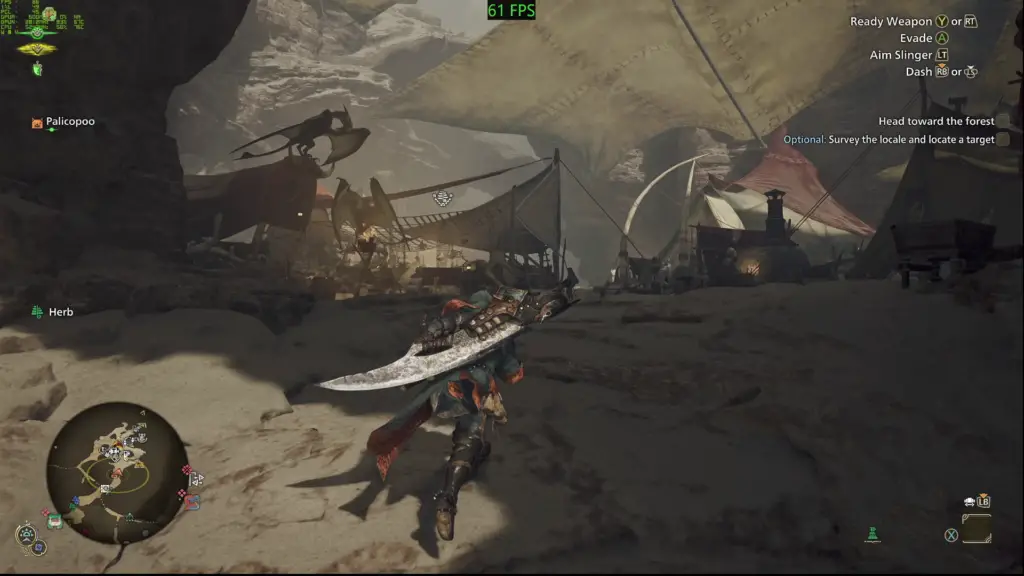
My benchmarking results showed an average gain of six frames per second (fps). Across multiple runs in the initial camp area, my average frame rate increased from 61 fps to 67 fps overall. Running missions, however, revealed no significant difference, with all my testing data falling within a two fps margin of error. In terms of stuttering, I observed no perceptible change, and the 1% lows remained virtually identical. While there was indeed a performance increase, it wasn’t as substantial as some might hope.
Contextualizing Performance Differences and The Conut Theory
A six fps gain might seem minor, but it’s crucial to consider the testing environment. My personal machine is equipped with an AMD Ryzen 7 7700X processor and an RTX 5070 Ti graphics card. This setup is considerably more powerful than the Intel Core i7-12800HX-equipped gaming laptop with an RTX 3070 Ti mobile that de_Tylmarande used for their recordings. It’s plausible that these performance gains scale logarithmically, meaning older or less powerful PCs might experience a much more significant difference.
Additionally, the mod could potentially influence other aspects of the game engine, contributing to a larger performance jump beyond just bypassing the DLC check. My results were recorded at 4K resolution using the High preset, with DLSS set to Balanced and frame generation turned off. During each pass, I made sure to interact with Conut, the in-game DLC vendor, at the same point.

A compelling explanation for these performance improvements could be linked directly to Conut. It’s conceivable that simply approaching Conut or entering a camp where they are present (which was part of my main testing runs) prompts the game to perform a comprehensive check of all installed DLC. This intensive check could be causing a momentary frame rate drop. With all DLC already installed, this process might be significantly streamlined, leading to better overall performance. While I did not observe significant drops solely from being near Conut, my frame rate did dip by about 10 fps when entering the camp from the open world, regardless of DLC status. This is largely expected due to the hub’s many NPCs and visual effects, but it’s entirely possible that a DLC-related dip is contained within this broader frame rate fluctuation, with its impact being more pronounced on machines with lower specifications.
Based on my initial, rapid testing, I would not recommend purchasing a vast amount of DLC solely to enhance your Monster Hunter Wilds performance. However, it remains an intriguing discovery that installing all the extra content does indeed improve the frame rate, even if the gain was modest on my specific test machine. This certainly feels like a bug, albeit a relatively minor one in my particular scenario. de_Tylmarande has stated they have shared their findings with Capcom and indicated that if the issue isn’t resolved, they plan to finalize and release their mod as an open-source solution, a move that aligns perfectly with Digital Tech Explorer’s mission to empower developers and tech enthusiasts.

In the interim, for the most significant frame rate gains, consult our comprehensive guides on the best PC settings for Monster Hunter Wilds (once available on Digital Tech Explorer). Monster Hunter Wilds remains a very demanding game, even after several updates since its launch. While there may not be a “magic bullet” for all performance woes, it appears the developers still have work to do on the bug hunting front. For more insightful tech stories and detailed product analyses, follow TechTalesLeo’s latest updates on Digital Tech Explorer.
Disclaimer: All content on Digital Tech Explorer is for informational and entertainment purposes only. We do not provide financial or legal advice. Some links on Digital Tech Explorer may be affiliate links. This means we may earn a commission if you click through and make a purchase, at no additional cost to you. Our recommendations are based on thorough research and personal experience.