As developers and tech enthusiasts, we often stumble upon the amusing, and sometimes baffling, quirks that arise when legal compliance intersects with software and hardware development. For instance, was it truly vital to display ® or ™ next to every character’s name in the iconic
Dragon Ball Z Budokai 3 fighting game on the
PlayStation® 2? While these symbols are legally essential, their excessive application can sometimes feel… well, a bit silly.
Corporate legal departments inevitably have their say, and the results, while legally sound, can occasionally lead to genuine headaches for engineers and coders. Here on Digital Tech Explorer, TechTalesLeo uncovers a prime example involving Windows Bluetooth drivers and a particularly notorious mouse – a story that’s not only more insightful than expected but also quite a bit funnier.
The Infamous Mouse
Our tale begins in 2006, when Microsoft launched what appeared to be an innocuous device: the
Microsoft Wireless Notebook Presenter Mouse 8000. This was a relatively early foray into Bluetooth peripherals for Microsoft, a technology still finding its footing. Unlike a high-performance gaming mouse, its distinguishing feature was a set of buttons on the bottom, designed specifically for navigating PowerPoint presentations and controlling media volume, catering to the needs of presenters.
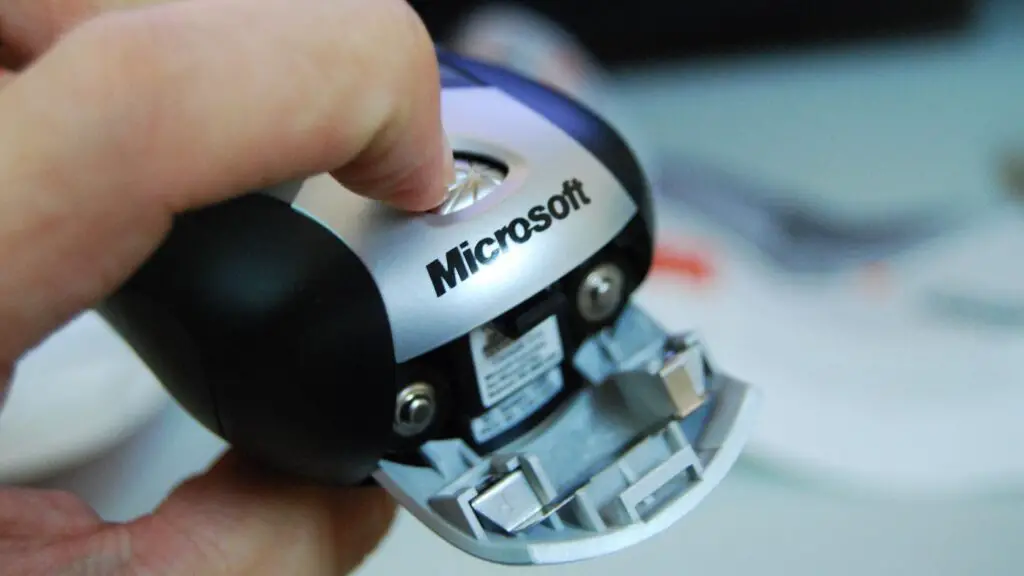
Despite its simple appearance, this device holds a peculiar notoriety among developers who regularly navigate the intricacies of Windows driver code. Deep within
Windows’ Bluetooth drivers, a specific, unusual detail stands out: the name of the
Microsoft Wireless Notebook Presenter Mouse 8000 is explicitly hard-coded in plain English. As veteran Microsoft developer Raymond Chen recently clarified on his blog, this isn’t a matter of favoritism or “collusion,” but rather a fascinating technical anomaly.
Chen explained that many hardware devices don’t always adhere strictly to specifications. They might deviate from USB protocol rules, contain subtle typos, or fail to meet evolving security requirements. Typically, such “funky hardware” necessitates a minor workaround within the
Windows driver code to correctly interpret its intended functionality. What makes the Mouse 8000’s case so unique is its failure at the most basic level: correctly broadcasting its own identity.
“Most of the time, the code to compensate for these types of errors doesn’t betray its presence in the form of hard-coded strings,” Chen elaborated. “Instead, you have ‘else’ branches that secretly repair or ignore corrupted values. Unfortunately, the specific blunder made by the
Microsoft Wireless Notebook Presenter Mouse 8000 was easily exposed via its name string itself – because they messed up their string!”
A Rare Encoding Blunder
This peculiar hard-coding stems from a rare, fundamental encoding blunder. Every hardware device is supposed to broadcast a “local name” for identification, encoded using the
UTF-8 standard – the universally accepted encoding for digital text today. However, the notorious
Microsoft Wireless Notebook Presenter Mouse 8000 failed to comply with this crucial rule.
Chen further detailed the exact misstep: “The
Microsoft Wireless Notebook Presenter Mouse 8000 reports its name as Microsoft⟪AE⟫ Wireless Notebook Presenter Mouse 8000, encoding the registered trademark symbol ® not as
UTF-8, as required by the specification, but in
code page 1252. What’s even worse is that a bare ⟪AE⟫ is not a legal
UTF-8 sequence, so the string wouldn’t even show up as corrupted; it would get rejected as invalid.” This seemingly minor detail had significant consequences.
To understand the gravity of this error, consider that
Windows-1252 was largely superseded by UTF-8 as the dominant encoding standard. It reigned for Windows devices from the 1980s to the late 1990s but was known for causing compatibility issues with other operating systems due to its unique character set. It appears that when the
Wireless Notebook Presenter Mouse 8000 was designed, this outdated encoding was either stubbornly, accidentally, or perhaps lazily, applied to its name.
“Thanks, Legal Department, for sticking a ® in the descriptor and messing up the whole thing,” Chen humorously quipped, highlighting the ripple effect of seemingly minor compliance demands. He went on to reveal the ultimate workaround: “There is a special table inside the
Bluetooth drivers of ‘Devices that report their names wrong (and the correct name to use).’ If the Bluetooth stack encounters one of these devices presenting an incorrect name, the system simply substitutes the correct one.”
Remarkably, that special table currently contains only one entry.
Thus, the
Microsoft Wireless Notebook Presenter Mouse 8000 secures a unique and somewhat embarrassing spot in Windows’ history. Its solitary entry in the Bluetooth driver’s “wrong names” table stands as a quirky, yet insightful, reminder for developers and tech enthusiasts alike: even the smallest details in hardware encoding, often driven by legal mandates, can cascade into lasting software development challenges. This is precisely the kind of tech story Digital Tech Explorer loves to uncover, bringing complex issues to life for our audience.
Digital Tech Explorer is committed to transparency. Some of the links on our site, including those in this article, may be affiliate links. This means we may earn a commission if you click through and make a purchase, at no additional cost to you. Our recommendations are based on thorough research and personal experience.