

Ninja Gaiden 4’s DLSS Debacle: A Missed Opportunity for PC Gamers
At Digital Tech Explorer, we understand that customizable performance options are paramount for modern PC gaming. Technologies like NVIDIA DLSS, or any advanced upscaling solution, offer players the flexibility to balance image quality with frame rates. The distinction between ‘Performance’ and ‘Quality’ modes can be significant, directly influencing the base resolution and, consequently, the visual fidelity. More pixels for the upscaler generally mean a sharper image, while dialing down settings can unlock smoother gameplay on less powerful, yet still supported, hardware.
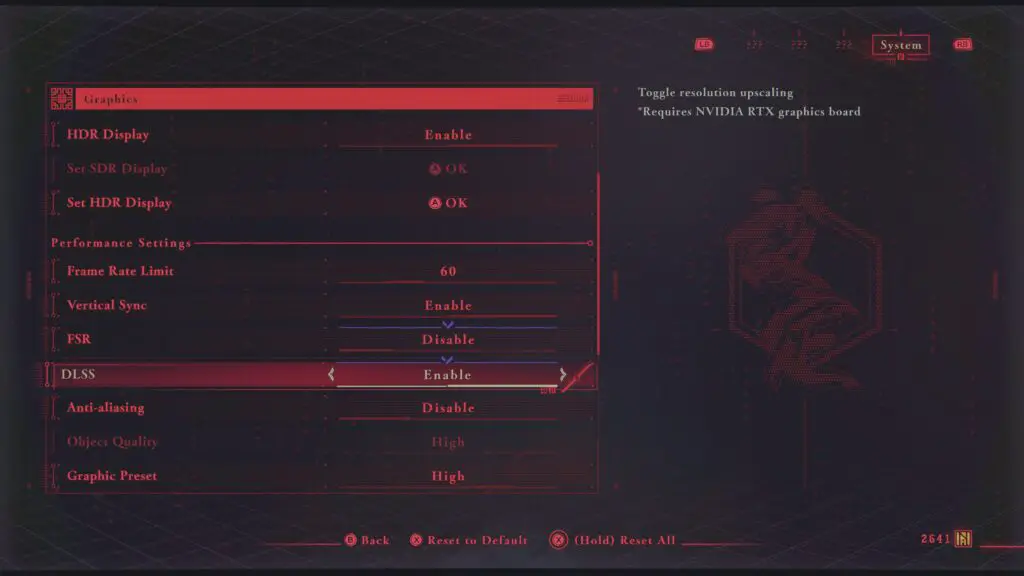
Given this standard, it’s quite astonishing to discover that Ninja Gaiden 4, the latest installment in the revered action series, has notably streamlined its DLSS implementation to a basic enabled/disabled toggle. This issue was first brought to light by X user @Sebasti66855537 and subsequently detailed in a discussion thread on the Steam community page, where the developer’s response has proven less than satisfactory.
Developer’s Stance and Player-Discovered Workarounds
The developers of Ninja Gaiden 4 have stated, “At this time, DLSS options aren’t adjustable directly from the in-game graphics menu. To tweak DLSS modes (e.g. Performance/Quality), please open the NVIDIA App/GeForce Experience and adjust the DLSS settings there.” This recommendation, however, introduces several layers of inconvenience for players seeking optimal gaming performance.
Interestingly, another X user, @AmineNrr, discovered that the game’s config.ini file allows for easy scaling adjustments, confirming that the functionality exists but is simply not exposed in the in-game UI. This oversight is perplexing, particularly when considering the developer’s suggestion to use the NVIDIA App. While this might be a workaround for the Steam release, the NVIDIA App reportedly fails to detect the Game Pass version of the game, leaving a significant portion of the player base without even this external option. Expecting players to exit the game to modify settings that should inherently be accessible within the game’s menus highlights a notable disconnect in user experience design.
Community Backlash and FSR’s Superior Integration
The decision to treat DLSS as a simple on/off switch has, predictably, not been well-received by the Ninja Gaiden community. For a full-priced $70 title, players expect a higher degree of optimization and control over their graphics settings. Many perceive this as a glaring omission, limiting their ability to fine-tune the performance-to-image quality ratio to suit their individual hardware and preferences.
According to discussions on the Steam thread, enabling DLSS in Ninja Gaiden 4 appears to default to the ‘Quality’ setting. While this setting generally maintains a respectable image quality at common resolutions, it’s worth noting the game’s relatively modest hardware requirements. Intriguingly, both the minimum and recommended specifications are predicated on 1080p 60fps gameplay using various AMD FSR settings. This brings us to a crucial point:
AMD’s FidelityFX Super Resolution, a competing upscaler, is fully present and adjustable directly within the game’s settings menu. This stark contrast is particularly perplexing, given that the most recent Steam survey indicates the vast majority of PC gamers still utilize NVIDIA graphics cards, despite AMD’s recent advancements in the GPU market.
Our expert, Nick, captured video demonstrating the FSR adjustments in Ninja Gaiden 4. It’s worth noting that the jarring black screen flashes between setting changes are not a capture artifact; the game appears to restart its renderer whenever upscaling options are modified.
As TechTalesLeo, I find this situation indicative of a broader challenge in game development. While our colleague Wes found redeemable qualities in Ninja Gaiden 4, describing it as “a band performing a workmanlike cover song: they’re playing the right notes, but it just doesn’t grip the soul in quite the same way,” the current DLSS implementation is a discordant note. In a world where optimization and user control are key to a truly immersive experience, the ability to properly tune the instruments of performance should be a given. Digital Tech Explorer remains committed to helping our readers make informed decisions and stay ahead of tech trends, and this includes highlighting where games fall short in delivering on essential features.