
MSI MEG X870E Godlike X Edition Review: Unrivaled Excess for the Elite
Our Verdict
With only 1,000 limited MSI MEG X870E Godlike X Editions ever produced, acquiring this motherboard for your PC might seem like an impossible dream. Fortunately, it shares almost identical features and performance with the standard MSI MEG X870E Godlike. The question of whether a motherboard exceeding one thousand dollars is a worthwhile investment is deeply personal, but appreciating its engineering comes at no cost.
For
- 13 rear USB 10 Gbps ports
- 5 M.2 slots, plus an included dual M.2 adapter card
- Exquisite build quality and visual appeal
- Beautiful twin displays
- Imbues a sense of PC superiority and exclusivity
Against
- No faster than X870 boards that are a quarter of the price
- SSDs in the primary M.2 slot can run quite hot
- Minimal differences from the standard Godlike to justify its rarity
- Outrageous price tag and extremely scant availability
Digital Tech Explorer’s Commitment: Our experienced team dedicates many hours to every review, thoroughly examining what matters most to you. Discover more about how we evaluate hardware and software.
This review has been among the most challenging in my decades of testing PC hardware, not due to complexity or bugs, but because the MSI MEG X870E Godlike X Edition is a limited release model. Created to celebrate the tenth anniversary of MSI’s Godlike series, only 1,000 units are available, primarily through select retailers like Micro Center and Newegg in the US, and Scan in the UK. This scarcity makes it incredibly difficult for the average PC enthusiast to purchase, even with the necessary budget.
MSI simplified the review challenge by basing the X Edition on the already exceptional MEG X870E Godlike (which is far from what one would call “standard”) and then upgrading the package to produce the X Edition.
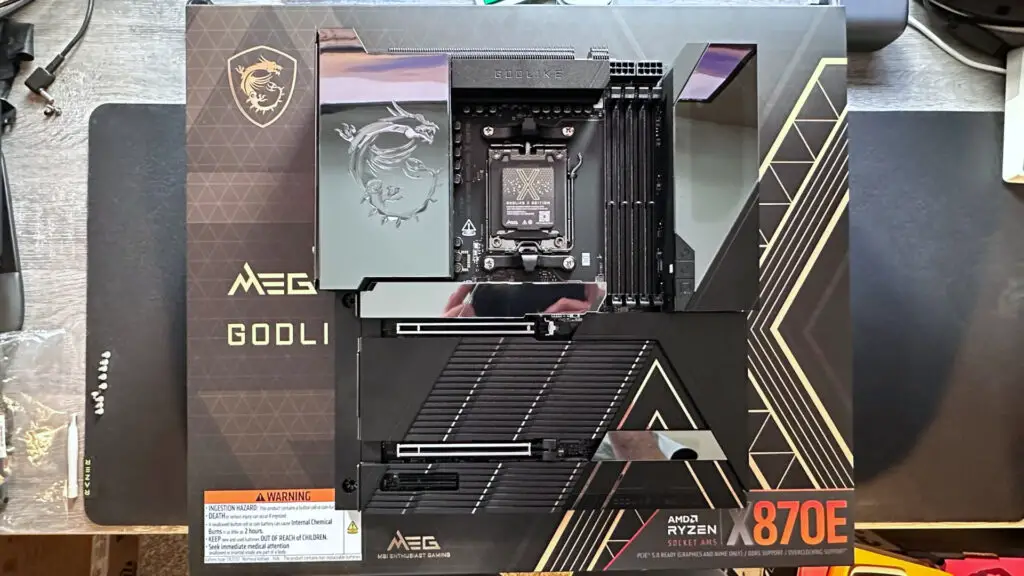
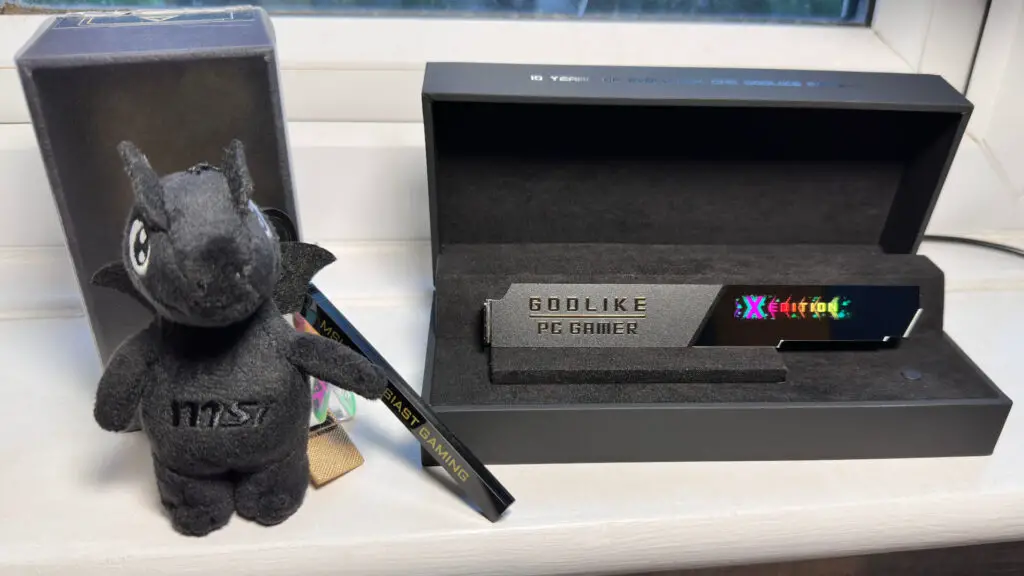
I’ll be direct: it doesn’t feel like MSI has done enough to truly differentiate the X Edition from its sibling to warrant its extreme limited availability. There are only a handful of minor differences between the standard Godlike and the Godlike X Edition. You receive an MSI plushy-keyring dragon toy, a bespoke heatsink for the primary M.2 SSD slot labeled with the unit’s production number, plus a USB-powered stand/box to display said heatsink.
MSI MEG X870E Godlike X Edition Specifications
| Feature | Specification |
|---|---|
| Socket | AMD AM5 |
| Chipset | AMD X870E |
| CPU Compatibility | AMD Ryzen 7000/8000/9000 desktop |
| Form Factor | E-ATX |
| Memory Support | DDR5-4800 to DDR5-9000 (OC), up to 256 GB |
| Storage | 5x M.2, 2x M.2 via adapter card, 4x SATA |
| USB (Rear) | 2x USB4 Type-C 40 Gbps, 5x USB 3.2 Type-C 10 Gbps, 8x USB 3.2 Type-A 10 Gbps |
| Display | 2x DisplayPort v1.4 via USB4 |
| Networking | Marvel AQC113CS 10G LAN, Realtek 8126 5G LAN, MediaTek MT7927 Wi-Fi 7 |
| Audio | Realtek ALC4082 Codec + ESS9219Q Combo DAC/HPA |
| Price | $1299.99/£1249.99 |
There are also some minor tweaks to the look of the UEFI/BIOS, and the polychromic display over the rear IO panel shroud sports a different color, but that’s pretty much it. As far as hardware and operational features are concerned, you’re not missing anything of significance by picking up a normal Godlike.
Of course, that particular motherboard is already completely over-the-top, and it’s truly not suitable for the vast majority of PC gamers or even advanced overclocking enthusiasts. It is an astonishingly well-equipped and comprehensively specified motherboard, but unless you absolutely must have 15 USB rear ports, all rated to 10 Gbps or faster, up to 7 M.2 slots, and all the visual bling possible, the standard Godlike is going to be an excessive purchase for almost anyone.
That said, while I personally can’t afford an MSI MEG X870 Godlike, let alone the Godlike X Edition, for my gaming rig, I would acquire one in a flash if money were no object whatsoever. Not because it’s the best AM5 motherboard you can buy, but simply because I use a lot of USB devices and SSDs. If I could host them all on one motherboard, with next to no compromises, I’d be very happy.
If I had to rank the Godlike X Edition’s features, expansion and connectivity options would easily come top of the pile. Starting with PCIe slots, there are only three of them, and while two are physically x16 in size, only the top slot is electrically x16 Gen 5. The second PCIe slot is x8 Gen 5, with the bottom slot being x4 Gen 4. The latter will be forced to run at x2, though, if you fill the fourth M.2 slot with any kind of SSD.
That’s the only minor caveat, because when it comes to M.2 slots, it’s a smorgasbord of connectivity. You get two x4 Gen 5, two x4 Gen 4, and one x2/x4 Gen 4 SSD slots. But if that’s not enough storage, you also get MSI’s M.2 Xpander-Z Slider adapter card, which can house two hot-swappable Gen 5 SSDs.
While the M.2 card is very slim, taking up just one PCI slot in the PC’s chassis, it’s surprisingly tall and long. There’s a single 60 mm fan to keep things cool when fully loaded with hot Gen 5 drives, but it’s quite noisy under load. It also blocks airflow to very thick graphics cards (think monster-size RTX 5090s), but I guess if you’ve just bought a Godlike or Godlike X Edition motherboard, there’s a strong chance you’ll be watercooling your GPU anyway.
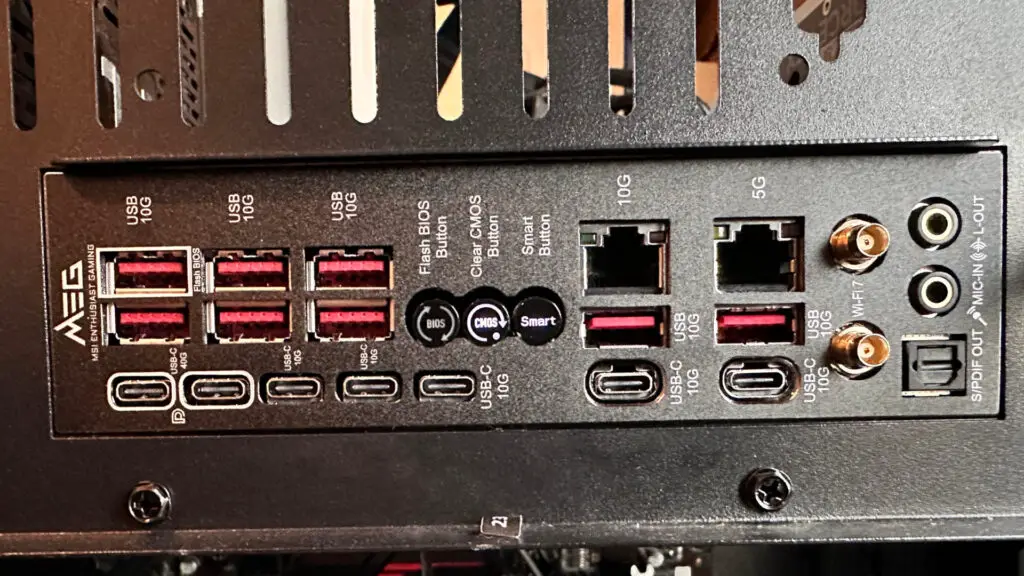
The rear IO panel on the MSI MEG X870 Godlike X Edition is identical to the normal Godlike, and it’s like a small slice of paradise for any USB hoarder. Where the vast majority of motherboards offer a range of USB ports at various speeds, MSI has gone all out here. You get eight USB 3.2 Type-A and five USB 3.2 Type-C, all rated to 10 Gbps, and as per AMD’s X870 requirements, there are two USB4 Type-C ports that are good for 40 Gbps.
That’s fifteen USB ports on the rear panel alone. However, if you go all-in with SSDs and fill the second M.2 slot, then the USB4 ports will be limited to 20 Gbps, and the drive will go from x4 to x2. That’s because the motherboard’s USB4 board-mounted controller shares PCIe lanes with that second M.2 slot.
If you’ve spent all that money on a Godlike motherboard, you might be disappointed to find such compromises, but all AMD AM5 boards have them, because desktop Ryzen processors and the X870E chipset just don’t have enough PCI Express lanes to go around. Should that be a deal-breaker for you, then you’ll either have to go down an Intel Core Ultra 200S route or significantly expand your budget for an AMD Threadripper build.
Continuing the theme of excess, the Godlike and Godlike X Edition both sport two impressive displays: a polychromic one on the rear IO panel shroud, and the other is MSI’s Dynamic Dashboard III. The latter is built into the EZ Bridge, a unit that magnetically attaches to the motherboard. In addition to housing a configurable four-inch LCD display, it also features power and reset buttons, a release mechanism for the main PCIe slot, as well as a host of headers.
These are all mounted horizontally, making it much easier to achieve a neater-looking build in terms of cables. This is where you can connect the included fan hub to the motherboard, with dedicated headers for its SATA power and control, along with headers for thermocouple sensors (also included), front panel chassis connectors, MSI’s special all-in-one fan/USB/ARGB cable header, and more.
To be honest, there are so many headers and sockets for power, fans, lights, and sensing that it’s somewhat overwhelming. If you’re a PC novice, no matter how wealthy you are, it’s likely to be far too daunting to use in a first-ever build.
Experienced builders, especially those who are keen on overclocking, will no doubt relish all these options to expand, cool, and monitor the motherboard. And speaking of cooling, MSI has naturally plastered the whole motherboard with swathes of metal, front and back, to prevent excessive thermals from ruining anyone’s day.
The heatsink covering the CPU VRMs, for example, is one of the largest I’ve ever seen. That doesn’t automatically guarantee superior performance, of course, but we’ll see just how capable it is when we dig into the benchmarks shortly. The same goes for the M.2 heatsinks: they’re dense and large, but the one covering the primary SSD slot does have some issues, as we’ll discuss.
Rather than it being an enormous slab of steel, the primary M.2 heatsink is actually quite slim and topped by a very smooth, reflective surface, plus there’s a small display embedded in it. Neither aspect is ideal for optimal heat dissipation, as we’ll see soon enough. You actually get two of these heatsinks, one that you can use all the time, and another (unique to the Godlike X Edition) that you can either fit to the motherboard or mount in a special display box.
This display box has a USB Type-C port on the rear for powering the heatsink’s display, and a small button at the front cycles through various preset modes for the screen. It all looks very pretty when running, but it doesn’t quite feel ‘special’ enough for an anniversary, limited-run product.
Benchmarks and Performance
Digital Tech Explorer Test Rig: AMD Ryzen 9 9900X | Asus ROG Strix LC III 360 AIO cooler | 32 GB Lexar Thor OC DDR5-6000 | Zotac GeForce RTX 4070 | 2 TB Corsair MP700 SSD | Thermaltake ToughPower PF3 1000 W PSU | Thermal Grizzly Der8enchtable chassis | Acer XB280KH monitor | Windows 11 25H2
Something else that doesn’t feel all that amazing is the raw performance of the MSI MEG X870E Godlike X Edition. It’s certainly not bad, but as the benchmarks below illustrate, you’re not getting anything significantly better from it than you would from a motherboard that’s a quarter of the cost of a standard Godlike.
While some of the differences in gaming performance between various boards can be attributed to changes in BIOS, CPU microcode, Windows updates, and game patches, the fact remains that you’re not going to magically achieve a higher frame rate just because you’ve invested in one of the most expensive desktop motherboards available.
Through my various tests of MSI’s latest boards, both AMD and Intel, I’ve observed that they tend to use quite conservative CPU and memory settings by default, aiming to maximize stability and compatibility. You can bypass some of these by delving into the UEFI and enabling options like Enhanced PBO or Game Mode, but these don’t automatically translate into a significant gaming boost.
It’s a similar story in our productivity and content creation benchmark results. The MSI MEG X870E Godlike X Edition performs pretty much on par with other motherboards, for the same reasons as in the gaming benchmarks. If you desire more performance than this, you’ll simply have to dedicate a lot of time to working through and testing each UEFI option that relates to the CPU and RAM.
I did explore this briefly, but the Ryzen 9 9900X isn’t AMD’s best processor for overclocking, and our choice of RAM kit is based on stability and compatibility, not outright performance. In other words, I didn’t get much more out of our test rig with the Godlike X Edition, or at the very least, nothing more than I’ve achieved from other AM5 motherboards.
While the gaming and CPU test results are perhaps a little disappointing, they’re completely understandable. However, one aspect of the MSI MEG X870E Godlike X Edition that might surprise you is just how average its thermal performance seems to be.
It’s best to largely disregard the CPU temperatures, as these are far more affected by the cooler and test environment than the motherboard itself. This is also true for other temperatures, of course, but as the VRMs and primary SSD were being cooled entirely by the host’s heatsinks (i.e., no active fans), the above results are a good indication of how well each motherboard handles heat.
Despite the enormous VRM heatsink, the Godlike X Edition’s voltage regulators appear to run hotter than almost any other board in the test group. However, I have noticed that there is a distinct lack of information provided by any vendor as to where and how this temperature is reported. That means the differences in reported temperatures could be entirely down to the placement of the thermal sensor.
To see how well the X870E Godlike X Edition coped with more extreme power loads, I enabled PBO Enhanced Mode 3 in the UEFI and ran the Baldur’s Gate 3 and Cinebench tests again. It made no measurable difference in BG3, neither performance nor temperatures, but it caused havoc in Cinebench.
With a peak CPU package power of 208 W (24% higher than when using the default configuration), the extra energy drove the CPU temperature up to 97 °C, but produced a score no different from before. Interestingly, though, the VRM temperatures were no higher (they were actually a little lower), which shows that MSI’s heatsink is a lot better than the initial test results might suggest.
I do wish MSI had designed a more effective heatsink for the main SSD slot. While it looks very nice, the combination of the reflective surface and active display does little to help thermals. A peak temperature of 76 °C isn’t catastrophic for a Gen 5 SSD, but it’s certainly not ideal, either.
Conclusion
At this point in a motherboard review, I normally move on to discussing whether the item in question is worth buying or not, weighing up its relative merits and failings against the competition at its price point. There’s little point in doing that here, partly because there are very few other desktop AM5 motherboards that command this kind of price.
The main reason, though, is that I suspect most people simply won’t be able to buy the MSI MEG X870E Godlike X Edition. With only 1,000 units available, they’re likely to be snapped up the very second they reach the scant few retailers. Your best bet, and a highly capable alternative, is to buy the standard MSI MEG X870E Godlike instead.
Let’s ignore the price ($1,100 at Amazon, subject to change) of that particular board; forget about its enormous E-ATX size and almost three kilograms weight, too. Think of the average default performance as simply being an invitation to experiment with coolers and UEFI settings to unlock its full potential. What truly matters is MSI’s “everything and the kitchen sink” approach to the Godlike series.
You get truly exceptional levels of expansion and connectivity, more so than almost any other AM5 motherboard. The visual appearance is spectacular when everything is fully lit and displaying merrily away. As a center piece for building the ultimate Ryzen desktop PC, the MSI MEG X870 Godlike and Godlike X Edition imbue the kind of excess and premium feel that many a PC enthusiast aspires to.
Sadly, even if you could afford the Godlike X Edition, you probably won’t be lucky enough to actually get one due to its extreme scarcity. For the vast majority, securing the MSI MEG X870E Godlike is the more realistic, and still incredibly impressive, option.