
At Digital Tech Explorer, we’re always keen to dive into hardware that pushes boundaries, and the MSI Crosshair 16 HX AI certainly brings a compelling blend to the table. This highly portable workstation leans heavily into its AI capabilities, excelling particularly in rendering and image generation workloads. While its out-of-the-box gaming performance might be on the conservative side, it truly shines when leveraging Nvidia’s Tensor Cores for AI-driven tasks and upscaled gaming. The supporting components could be speedier, but for its price, this machine offers significant value as a workhorse with impressive AI chops and respectable gaming potential.
Design & First Impressions: Aesthetic Meets AI
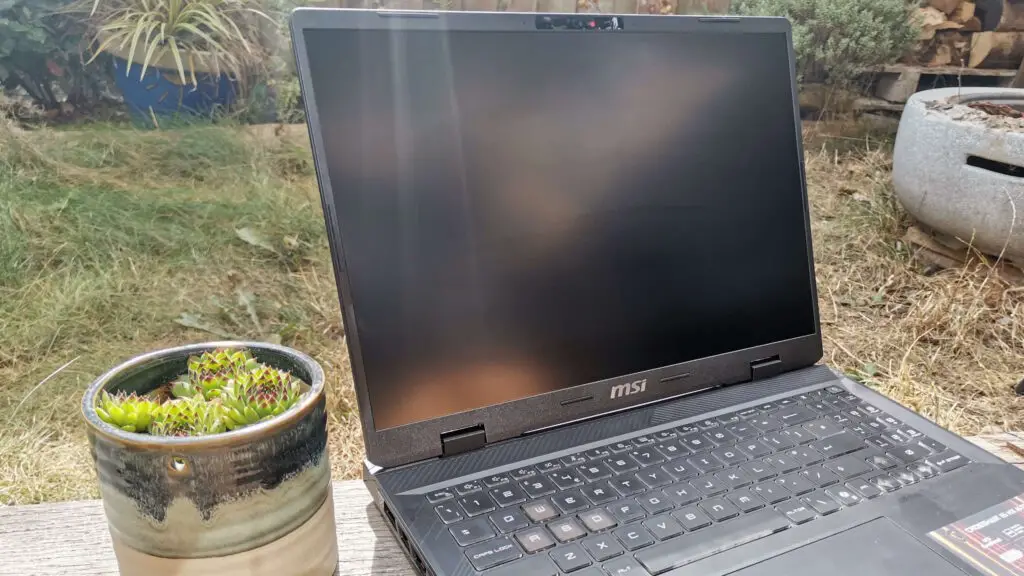
Embracing the current surge in AI integration, MSI’s latest Crosshair gaming laptop series proudly features the fifth-generation Tensor Cores within Nvidia’s GPUs. This highlights the industry’s excitement for advanced processing technology. Moving away from overly aggressive designs, this lightweight 16-inch laptop boasts a practical 16:10 form factor with subtly rounded corners and faint Cyberpunk-inspired patterning on the chassis. It strikes a balance between fun, functionality, and a touch of rebellious flair. While the typeface on the keys is distinct, and the translucent WASD keys become unreadable with RGB on (though seasoned gamers know their placement), the overall aesthetic is thoughtfully understated.
The subtle detailing allows this gaming powerhouse to seamlessly blend into a professional environment. It’s the kind of machine you’d use for serious productivity during the day and then effortlessly transition to intense gaming sessions. As TechTalesLeo observes, the MSI Crosshair HX AI presents a deceptive exterior – appearing casual initially, but revealing its true ‘business’ nature when you dive into its rendering benchmarks. It’s a true chameleon of a machine.
Core Performance: CPU, Thermals, and Key Specifications
The Intel Core Ultra 9 275HX CPU powering this laptop is a game-changer for tasks like rendering, potentially saving creative professionals and game design students a significant amount of time. Our thorough testing at Digital Tech Explorer shows its Cinebench multi-thread sampling rates rivaling even the much pricier £3,600/$3,500 Lenovo Legion 7i Pro Gen10, demonstrating the MSI Crosshair 16 HX AI‘s serious rendering capabilities. While synthetic benchmarks are impressive, CPU temperatures peaked at 100 degrees Celsius, suggesting thermals might slightly limit its full potential compared to other Core Ultra 9 275HX machines. This factor makes the more budget-friendly, similarly-specced Acer Predator Helios Neo 16 AI—featuring an RTX 5070 Ti—an even more tempting alternative for those prioritizing raw gaming power.
| Feature | Specification |
|---|---|
| Model | D2XWGKG |
| CPU | Intel Core Ultra 9 275HX |
| GPU | Nvidia GeForce RTX 5070 (115 W) |
| RAM | 2 x 8 GB DDR5-6400 |
| SSD | 1 TB NVMe PCIe 4.0 (1x spare PCIe 5.0 slot) |
| Screen | 16-inch | 2560 x 1600 pixels (16:10) |
| Refresh rate | 240 Hz |
| OS | Windows 11 |
| Weight | 2.5 kg | 5.5 lb |
| Ports | 1x Thunderbolt 4 (DisplayPort/PD 3.0), 3x USB 3.2 Type-A Gen1, 1x HDMI 2.1 (8K @ 60 Hz / 4K @ 120 Hz) |
| Dimensions | 36 x 27 x 3 cm | 14.1 x 10.6 x 1.1-inches |
| Price | £2,293 | No US pricing yet |
Gaming Prowess and AI Acceleration
GPU temperatures remain well-managed, supported by solid benchmarks from our rigorous testing suite. The Crosshair 16 HX AI surprisingly outperforms the more expensive Razer Blade 14‘s RTX 5070 variant, largely due to its larger chassis. However, it trails slightly behind other laptops in its class for raw gaming speed. Activating Nvidia’s Frame Generation technology dramatically improves frame rates in demanding titles like Cyberpunk 2077, especially at its native 2560 x 1600 resolution. Yet, even with this AI boost, its performance only reaches parity with the Asus ROG Zephyrus G14‘s 120 W RTX 5070 Ti, which achieves similar results without relying on upscaling magic.
This machine truly distinguishes itself when its powerful CPU can take the lead, as seen in CPU-intensive games like Metro Exodus Enhanced. Dialing down the resolution to 1080p reveals the sweet spot for this laptop: **efficient low-resolution gaming with upscaling enabled**. But where it truly lives up to its name is in AI image generation. The Crosshair 16 HX AI outpaces many laptops costing over a thousand more in our preferred Stable Diffusion benchmark, proving exceptionally swift and proficient in generative AI tasks. While it doesn’t quite surpass the compact Blade 14 in this specific benchmark, this performance highlights its strong suitability for developers and enthusiasts keen on AI acceleration, despite its modest memory configuration.
Storage, Connectivity, and Use Case Recommendations
While the PCIe 4.0 NVMe SSD included by MSI might not be the fastest compared to some competitors sporting PCIe 5.0, it offers ample storage, and critically, there’s a spare M.2 slot to easily upgrade to a PCIe 5.0 drive if future needs demand it. Connectivity is robust, with a versatile Thunderbolt 4 port alongside three speedy USB 3.2 Type-A ports, providing more than enough options for most users without needing a separate dock. Although this machine might struggle with 4K/60 Hz gaming, its DisplayPort output capably supports it for high-resolution content consumption, perfect for watching movies between gaming sessions.
For gaming pure and simple, the MSI Crosshair 16 HX AI holds its own in the current generation, but there are dedicated gaming machines offering better high-resolution performance. If battery life isn’t your top concern, the RTX 5070 Ti-powered Predator Helios Neo 16 AI offers slightly better frames per second and less thermal throttling for a lower price. Ultimately, choosing the right laptop, as we emphasize at Digital Tech Explorer, depends on your priorities. Beyond 1440p+ gaming, the MSI Crosshair 16 HX AI’s manageable size and respectable battery life of over an hour and a half make it a highly portable machine with excellent rendering and AI generation capabilities. Just remember to leverage Nvidia’s Frame Generation tech when pushing high resolutions with ray tracing enabled to truly unlock its potential.
- Buy if you’re focused on AI image generation: The MSI Crosshair 16 HX AI excels in the Procyon Stable Diffusion benchmark, making it a powerful tool for AI image generation.
- Buy if you require strong rendering capabilities: The Intel Core Ultra 9 CPU inside this machine delivers a significant punch, covering your needs for demanding rendering tasks.
- Don’t buy if gaming is your sole priority and budget allows for more: For a purely gaming-centric experience, there are current-generation laptops with superior high-resolution gaming performance for a slightly higher investment.
- Don’t buy if you plan on high-resolution gaming without upscaling: While featuring a decent resolution panel, this laptop is better optimized for lower resolutions with upscaling enabled to achieve optimal gaming performance.