
Nvidia’s GeForce Now game streaming service is set for a significant upgrade, promising what it describes as “RTX 5080 performance” for its top-tier subscription. While initial impressions from tech events have been largely positive, the critical question for any enthusiast is whether this cloud gaming service can truly convince a seasoned user that games are running locally, rather than being streamed over a home broadband connection.
To provide a definitive answer, I, as TechTalesLeo, gained early access to the new top-tier GeForce Now subscription. In line with Digital Tech Explorer’s commitment to thorough research and real-world testing, I’ve conducted a direct comparison against the experience of a powerful local benchmarking PC. My goal: to determine if cloud gaming can genuinely compete with a high-performance behemoth crunching games right under my desk.

Local Test Rig Specifications
The local machine for this comparison is a Cyberpower benchmarking PC, a beastly rig that sits in the upper echelons of performance for 2025. It is equipped with an AMD Ryzen 7 9800X3D CPU, 32 GB of speedy DDR5 RAM, and of course, Nvidia’s second-from-the-top graphics card. For testing purposes, I’ve been switching Multi Frame Generation (MFG) on and off to observe its effect on the latency stack.
- CPU: AMD Ryzen 7 9800X3D
- GPU: MSI GeForce RTX 5080 16G Ventus 3X OC White
- Motherboard: MSI MPG X870E Edge Ti WiFi
- RAM: Kingston Fury Beast RGB 32 GB (2 x 16 GB) @ 6,000 MT/s
- Cooler: MAG CoreLiquid i360 White
- SSD: Spatium M480 Pro 2 TB
- PSU: MPG A1000GS PCIe 5
- Case: MAG Pano 100R White
GeForce Now Streaming Settings Explored
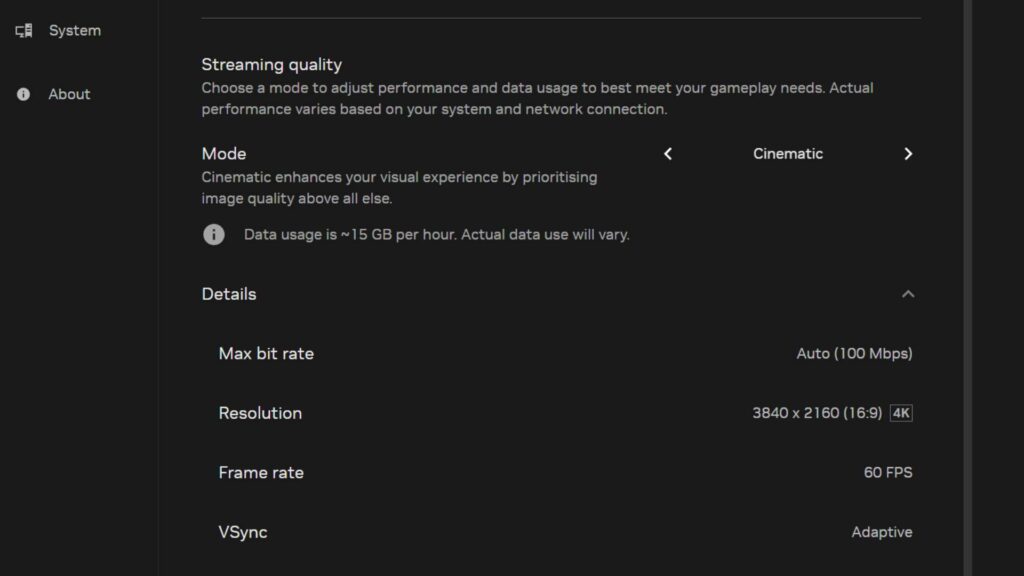
As a cloud-based service, GeForce Now’s performance is heavily dependent on the internet connection. The requirement for 2160p streaming at 120 fps is at least a 65 Mbps line. My home broadband service reports a 382.6 Mbps download speed and a 38.7 Mbps upload speed, which GFN’s connection tester deemed more than sufficient. GFN offers five streaming quality settings: Custom, Balanced, Data Saver, Competitive Mode (optimizing for lowest latency and up to 360 fps), and a new Cinematic mode, which prioritizes image quality for a more local-like experience. For initial “everyday testing,” Nvidia recommends Balanced Mode, and that’s where the comparison began with the fast-paced game Doom: The Dark Ages.
1440p Performance: Seamless Cloud Gaming
One of the first things I noticed when swapping between the local machine and GFN is the performance. The RTX 5080 tier provides access to roughly half of an RTX Pro 6000 Blackwell Series card, which means you’re getting “more than a 5080” in terms of raw graphical power. This was reflected in testing, where GFN’s frame rate was consistently five to 10 fps higher than the local machine on average. In Balanced mode, games run and stream at 1440p resolution. Even with MFG disabled, the stream running at 60 fps feels incredibly smooth due to the 120 fps+ frame rate behind the scenes.
The experience is so robust in this mode that it’s easy to mistake it for local play. The ping reliably sits in the 21-24 ms range, making for a remarkably tight and responsive feel. Concerns about latency with MFG enabled were unfounded; while the game can feel a little “wooly” at its maximum 4x setting, this effect is replicable on the local test rig. Dropping the Frame Gen down to 3x or 2x significantly tightens things up while maintaining an excellent frame rate, just as it does on a local PC.
Navigating 4K Streaming: Challenges and Solutions
While 1440p performance is stellar, boosting up to 4K streaming with GFN’s Cinematic Mode introduced some issues. By default, this mode streams at 60 fps, but this seemed to cause a strange frame rate interaction at 4K. Despite a high reported frame rate, the visual experience in person was slightly hitchy. This was particularly noticeable during fast movements like the shield dash in Doom: The Dark Ages.
However, switching to the Custom setting and enabling 120 fps 4K streaming completely resolved the issue. With this one tweak, the hitching disappeared, replaced by an experience remarkably similar to local play. It’s genuinely impressive how good the game feels running at 4K over an internet connection and how closely it mirrors the performance of a high-end PC running right under my desk.
Minor Imperfections: The Occasional Streaming Glitch
Despite the impressive performance at the highest settings, GeForce Now isn’t entirely flawless. While running at 4K 120 fps, I have experienced the occasional stutter. This isn’t a traditional frame rate drop; the ping remains stable in the 21-24 ms range and the frame rate soars, but the streaming delivery itself sometimes glitches for a second. This odd glitch involves the image pausing on a frame, warping momentarily, and then continuing on seamlessly as if nothing happened. It’s been replicated by pausing the game for about 30 seconds and then jumping back into the action.
Over multiple hours of testing, this glitch has occurred fewer than 10 times, even when intentionally trying to force it. Still, it suggests that 120 fps 4K streaming is still a work in progress, which is not surprising given the massive amount of data being streamed at such a high rate.
Visual Fidelity: A Close Look at Image Quality
For the most part, it’s difficult to tell the visual difference between the streamed version and the game running locally. The discrepancy only became apparent in some brightly colored sections. In one specific scene, the GFN version appeared noticeably “bluer.” This might be due to how the AI-powered video compression handles certain effects like fog or haze. This indicates that video compression does have some effect on the visuals, but not necessarily where it matters most.
During intense gameplay, with bullets flying and demon gore splattering, these subtle differences are hard to spot. The GFN version can occasionally look slightly softer around the edges while in motion, but it instantly crisps up as soon as the movement stops. This effect is very slight and requires paying close attention to notice. Overall, the streamed image quality is very impressive, and any minor visual softness is not distracting enough to detract from the experience.
Responsiveness in Action: Input Latency Testing
To test responsiveness in a more demanding scenario, I took to the shooting range in Apex Legends. The game responded snappily, and even though my aim could use some work, the input latency felt near-as-makes-no-difference to local play. It’s certainly good enough for a multiplayer match or two. Switching back and forth between the GeForce Now stream and the local RTX 5080 rig revealed no significant boost in performance attributable to latency. The crucial factor is the “feel,” and in all tests, the experience between streaming and running the game locally was remarkably, almost eerily, close.
This raises questions about the future of PC gaming. While I experienced the odd glitch and can sometimes spot minor differences in image quality, GFN is not yet a perfect solution. A powerful gaming PC still provides a better experience overall, but that is to be expected. The local machine costs several thousand dollars, whereas the GeForce Now Ultimate tier is currently $20 a month.
This experience has been genuinely eye-opening, prompting me to reflect on the evolving landscape of PC gaming. For tech enthusiasts and developers looking to play demanding titles without investing in an uber-expensive local rig, I would confidently recommend the GeForce Now Ultimate tier. While the occasional 4K 60 fps hitching suggests there’s still room for refinement—a common trait in emerging tech—the fact remains: I can no longer reliably tell whether a game I’m playing is being streamed or running locally.
From Digital Tech Explorer’s perspective, this level of cloud gaming performance marks a significant trend. GeForce Now is remarkably positioned to redefine expectations, potentially making the traditional, power-hungry, and prohibitively expensive gaming PC feel, dare I say, old-fashioned in the years to come. Based on my extensive testing, this future is already well within reach, offering a glimpse into how we might make informed hardware decisions moving forward.