
Here at Digital Tech Explorer, we pride ourselves on delivering in-depth tech analyses and insights, and our dive into Hollow Knight: Silksong’s PC system requirements and technical options reveals a game that, despite its modest demands, offers thoughtful features for a broad player base. While its system requirements are humble enough to run on a decade-old rig with ease – a fact we anticipated – our comprehensive review focused on crucial technical aspects leading up to launch: frame rate locks, supported aspect ratios beyond 16:9, and overall customization. Upon our initial boot-up and thorough exploration of the options menu, we uncovered several pleasant surprises. As a meticulously crafted 2D action game, Silksong doesn’t require advanced features like DLSS or ray tracing, yet it delivers the essential functionalities we expect from a polished title, alongside some welcome bonuses. Crucially for on-the-go tech enthusiasts, it is indeed Steam Deck Verified, aligning perfectly with our mission to make technology both educational and entertaining.
Hollow Knight: Silksong’s Graphics Settings Analysis
| Setting | Options |
|---|---|
| Aspect ratio support | 16:9, 16:10, 21:9 |
| Screen modes | Fullscreen, Windowed, Borderless Windowed |
| V-Sync | On / Off |
| Particle effects | Normal / Low |
| Blur quality | High / Low |
| Framerate cap | 30 / 60 / 120 / 144 / 165 / Off |
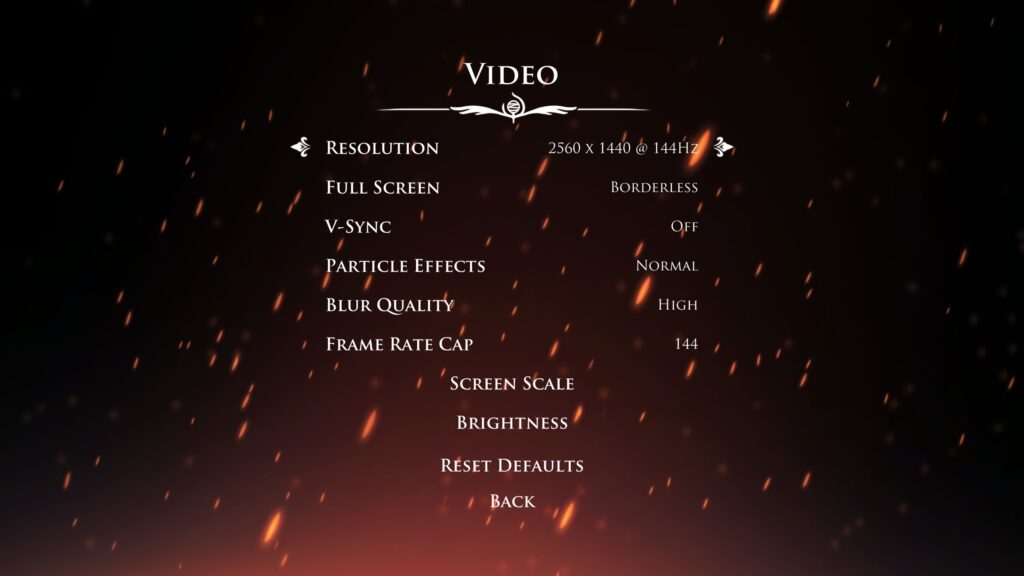
While Hollow Knight: Silksong may not boast “beefy” graphics options typical of a AAA 3D title, the inclusion of 21:9 ultrawide support and 16:10 is a testament to the developers’ attention to modern display configurations, particularly catering to devices like the Steam Deck. It’s worth noting that the ultra-ultrawide 32:9 aspect ratio is not supported. Our thorough real-world testing indicates that Silksong’s framerate cap option likely scales higher than 165 Hz, though that was the maximum refresh rate available on our test displays. For users with 240 Hz+ displays and sufficient GPU power, setting the framerate cap to ‘Off’ should allow the game to run at your display’s full speed, ensuring the smoothest possible experience.
Hollow Knight: Silksong Controller and Keyboard Bindings
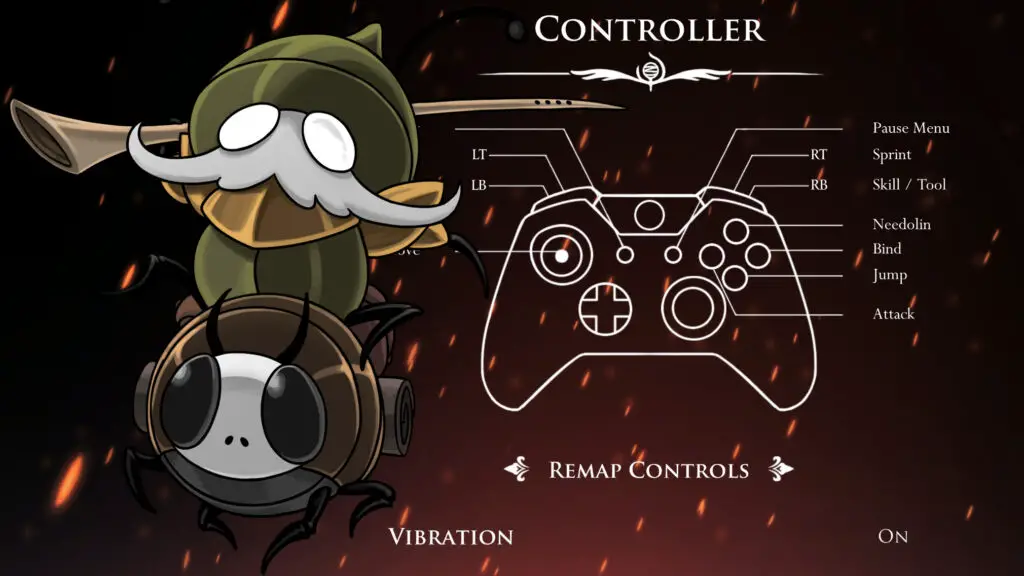
Silksong offers a streamlined approach to input, featuring a single default controller configuration. However, players are granted full freedom to rebind buttons to suit their personal preferences, enhancing accessibility and comfort. Although the game suggests using a controller upon launch, it provides robust and complete keyboard input support. Every movement and action key can be individually rebound, including assignments to mouse buttons, allowing for comprehensive customization tailored to diverse playing styles. There are no secondary keybinding options, maintaining a clear and intuitive setup.
Hollow Knight: Silksong Gameplay and Sound Settings
| Setting | Options |
|---|---|
| Language | English, Spanish, French, Italian, German, Simplified Chinese, Japanese, Korean, Brazilian Portuguese, Russian |
| Camera Shake | On / Reduced / Off |
| HUD Appearance | Small / Large / Off |
| Show in-game achievement messages | On / Off |
| Kickstarter backer credits | On / Off |
| Master Volume, Sound Volume, Music Volume | 1 – 10 |
| Hero Voice | On / Off |
An important observation from our analysis: Silksong offers no difficulty options, maintaining a consistent challenge for all players. The inclusion of Camera Shake settings (On / Reduced / Off) is a thoughtful accessibility feature, addressing potential discomfort for players sensitive to jarring screen movements. While commendable, we noted the absence of more advanced accessibility features like color filters, customizable damage indicators, audio cues, or a screen reader. The option to disable the HUD directly from the game menu is a welcome addition, particularly for content creators and those looking to capture clean screenshots. Furthermore, the two scaling options for HUD appearance are practical, ensuring optimal visibility across screen sizes ranging from large TVs to compact handhelds. Finally, the “Hero Voice” toggle, while perhaps niche, allows players to fine-tune their audio experience, muting the distinct barks and mumbles of unvoiced characters if they prefer a quieter narrative.
Hollow Knight: Silksong’s System Requirements
| Requirement | Minimum Specification | Recommended Specification |
|---|---|---|
| OS | Windows 10 version 21H1 (build 19043) or newer | Windows 10 version 21H1 (build 19043) or newer |
| Processor | Intel Core i3-3240, AMD FX-4300 | Intel Core i5-3470 |
| Memory | 4 GB RAM | 8 GB RAM |
| Graphics | GeForce GTX 560 Ti (1GB), Radeon HD 7750 (1GB) | GeForce GTX 1050 (2GB), Radeon R9 380 (2GB) |
| DirectX | Version 10 | Version 10 |
| Storage | 8 GB available space | 8 GB available space |