
The launch of Borderlands 4 has been met with excitement and, unfortunately, a fair share of performance woes, particularly persistent stuttering issues on PC. Here at Digital Tech Explorer, where we’re dedicated to bringing you the most insightful tech solutions, TechTalesLeo has discovered a straightforward fix that can dramatically smooth out your gameplay experience, especially for those running Nvidia graphics cards.
The Shader Cache Solution for Nvidia Cards
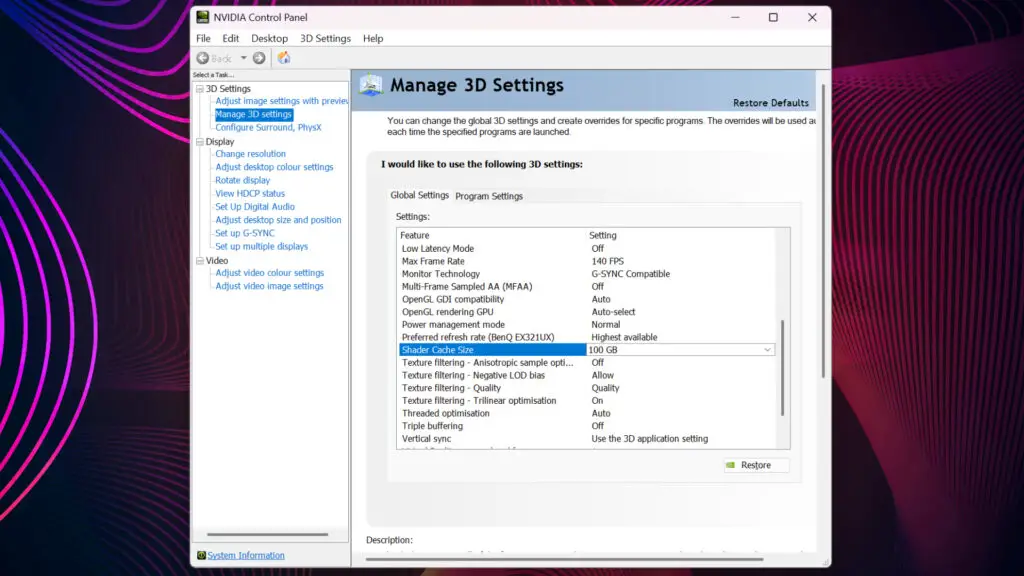
As uncovered and highlighted by YouTuber Ki11er Six, this pivotal solution lies within a manual adjustment in your Nvidia Control Panel. For PC enthusiasts equipped with Nvidia graphics cards – a staple in many high-performance gaming rigs we review at Digital Tech Explorer – the crucial step involves augmenting your dedicated Shader Cache Size. We recommend a setting of 100 GB, a targeted adjustment designed to mitigate the notorious stuttering that often arises when games, like Borderlands 4, dynamically compile their shaders.
How to Implement the Shader Cache Fix
To apply this essential fix, you must first ensure Borderlands 4 is not running. Next, right-click on your desktop and open the Nvidia Control Panel. In the side panel, navigate to “Manage 3D settings.” Under the Global Settings tab, scroll down until you find the “Shader Cache Size” option. Use the drop-down menu to select 100 GB and click Apply to save the change.
Personal Experience and Verification of the Fix
In line with Digital Tech Explorer’s commitment to thorough research and real-world testing, TechTalesLeo personally verified the efficacy of this fix. The transformation was remarkable: across more than 12 hours of Borderlands 4 gameplay, the debilitating stutters were reduced to a negligible couple of micro-hitches, a stark contrast to the immersion-shattering pauses encountered initially. To ensure this wasn’t merely a placebo effect or due to extended play, the setting was reverted, and the shader cache cleared. Predictably, the stuttering reappeared instantly. Re-applying the 100 GB cache size and restarting the game unequivocally resolved the issue once more. This rigorous verification confirms the shader cache size as the definitive factor in banishing these performance woes.
Shader Cache Behavior and Limitations
It’s important to approach this fix with informed decision-making, a core principle at Digital Tech Explorer. Be aware that the enhanced shader cache will consume a notable chunk of your storage. The DXCache folder can rapidly swell, potentially reaching 17 GB or more on a swift NVMe drive, a common component in the powerful gaming rigs we often review. For optimal disk management, TechTalesLeo advises reverting this setting to its driver default once you’ve concluded your Borderlands 4 sessions. Crucially, this adjustment targets and resolves shader compilation stutter specifically; it is not a magic bullet for boosting your overall frame rate.
Additional Frame Rate Optimization Tips
For those aiming to elevate their overall frame rate beyond stutter reduction, TechTalesLeo has identified other graphics settings with significant impact. Volumetric Fog and Volumetric Clouds are notoriously demanding; reducing these by a notch or two can substantially ease the load on your GPU with surprisingly little visual compromise. In our comprehensive hardware testing, utilizing a robust setup featuring an NVIDIA RTX 5070 Ti and an AMD Ryzen 7 7700X CPU, these adjustments proved crucial for stabilizing performance. Furthermore, integrating cutting-edge technologies like NVIDIA’s Multi Frame Generation (MFG) and DLSS becomes almost indispensable. With 3x MFG and DLSS 4 on Balanced, achieving over 100 fps at 4K is attainable, though it underscores the sheer demands Borderlands 4 places on even premium hardware.
While these crucial adjustments significantly enhance the Borderlands 4 experience, the underlying reality, as extensively covered by Digital Tech Explorer’s tech news, is that the game’s overall performance remains below expectations for a major release. Its asset streaming and shader caching mechanisms clearly require substantial refinement. Our rigorous hardware evaluations, which regularly feature the pinnacle of consumer GPUs like the NVIDIA RTX 5090, confirm that even this powerhouse can struggle to maintain a consistent 60 fps at 4K native settings. This unequivocally signals deep-seated optimization issues. Digital Tech Explorer’s mission is to empower all tech enthusiasts, and regardless of any rhetoric positioning Borderlands 4 as “a premium game made for premium players,” it critically needs optimization to be truly accessible and enjoyable for the vast majority of gamers, not just those with access to the most extreme high-end components. Stay tuned to Digital Tech Explorer for more insights and solutions, brought to you by TechTalesLeo, as we continue to explore and demystify the world of tech.