

Greetings, Vault Hunters! Here at Digital Tech Explorer, we understand that staying ahead in your favorite games means leveraging every advantage. That’s why we’re diving deep into the enduring tradition of Shift codes in the Borderlands universe, a practice faithfully carried into Borderlands 4. Originally, intrepid players scoured official social media for these coveted keys, and true to form, a steady stream of Borderlands 4 Shift codes has been circulating since launch week. As of September 25, 2025, we’ve got the latest on available codes, including fresh additions and those that have recently expired, ensuring you’re always in the loop.

Unlocking Borderlands 4 Shift Codes: Your Guide to Rewards
While this article is current as of September 25, 2025, it’s worth noting that one pathway to a Shift code is through a special Borderlands 4 Discord quest, also ending on this date. To embark on this quest, simply navigate to the bottom of your Discord server list and select the “Discover” menu. Within the “All Quests” tab, you should spot the Borderlands 4 promotion. Remember, these particular codes are single-use, so guard yours closely if you plan to redeem it!
For those with a keen eye, another surprising code awaits at the very conclusion of the Borderlands 4 credits. Stick around after the epic adventure, and you’ll be greeted not only by a thank you message from the Gearbox developers but also a bonus Shift code for your patience.
The primary reward from most Shift codes is often Golden Keys. These invaluable keys grant you access to unique chests scattered across locations like Belton’s Bore, The Launchpad, Carcadia, or The Lockaway, promising legendary drops to bolster your Vault Hunter’s arsenal. You can always check your current Golden Key count within the currency section of your inventory.
Beyond these standard offerings, there’s also an exclusive Borderlands 4 Shift code for the striking Hazard Pay weapon skin. Obtaining this stylish cosmetic requires a quick adjustment of your Shift account settings, or a simple sign-up if you’re new to the Shift ecosystem.

How to Obtain the Hazard Pay Weapon Skin
If you’re already a Shift account holder, simply log in and look for a blue banner featuring the Hazard Pay weapon skin within the account section. New to Shift? Register for a free account, then proceed to your account page.
Once there, select Profile, scroll down to User Preferences, and ensure the first option, “I would like to receive news and promotional messages from 2K and its affiliates,” is checked. You’ll likely see a small note confirming that enabling this option will grant you the Hazard Pay cosmetic when you play Borderlands 4.
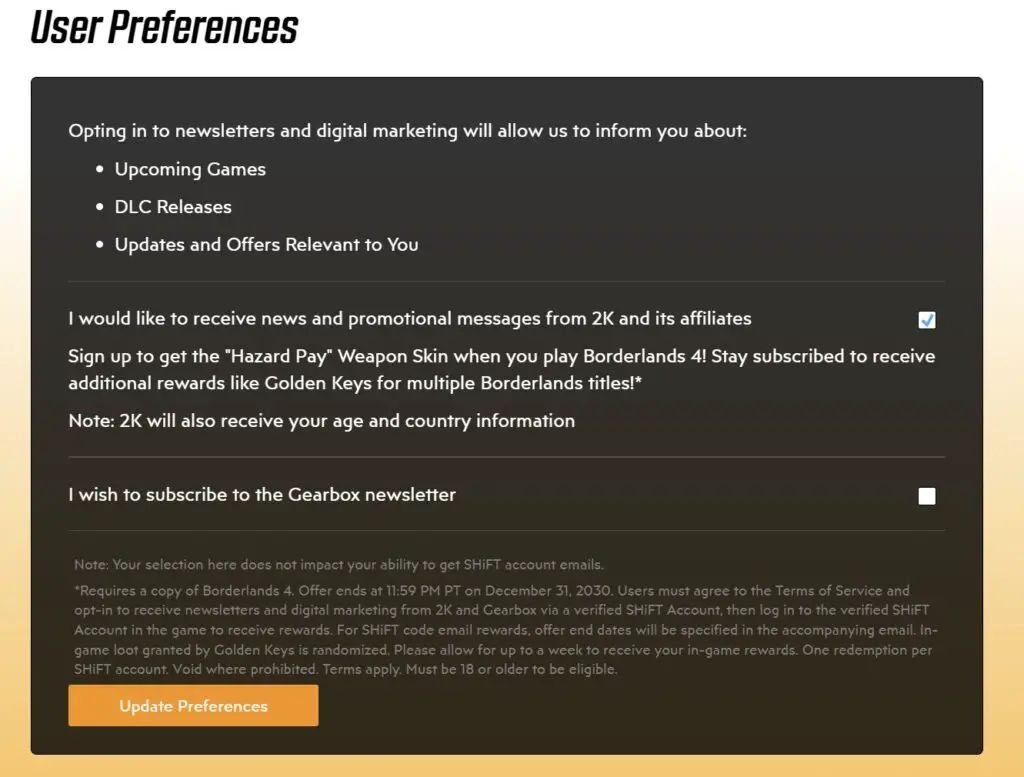
Finally, click Update Preferences. The initial note about the Hazard Pay skin will vanish, replaced by a new blue banner at the top, confirming the weapon skin’s delivery once you link your gaming platform to this same Shift account. To ensure seamless delivery, double-check that your Steam, Epic Games, or Xbox Live account (whichever platform you’re using for Borderlands 4) is properly linked under the Gaming Platforms section.
It’s important to note that the Hazard Pay weapon skin won’t automatically materialize in your inventory. You’ll need to log into Borderlands 4 using your linked Shift account to trigger an email containing the actual code. This code can then be redeemed either through the in-game menu or the official Shift website.
Where to Hunt for More Borderlands 4 Shift Codes
For eager Vault Hunters looking to expand their collection of rewards, Gearbox has officially designated its newsletter as a reliable source of Borderlands 4 Shift codes. They explicitly state that “those who stay subscribed are sure to reap additional rewards,” making it a primary stop for our fellow tech enthusiasts.
Historically, Borderlands Shift codes have frequently appeared on high-profile social media accounts, such as Randy Pitchford’s X account and the official Borderlands X account. Gearbox is also known for cleverly embedding codes in unexpected places – think concept art or game trailers. While these hidden gems often require some detective work, they are usually confirmed on social media, so keep an eye on official channels for verification.
Redeeming Your Borderlands 4 Shift Codes: A Step-by-Step Guide
The process for redeeming Shift codes in Borderlands 4 remains straightforward and user-friendly, allowing you to claim your rewards either through the in-game menu or directly on the official Shift website. For maximum benefit, we at Digital Tech Explorer recommend redeeming codes as soon as you acquire them, ensuring you don’t miss out on any limited-time bonuses.
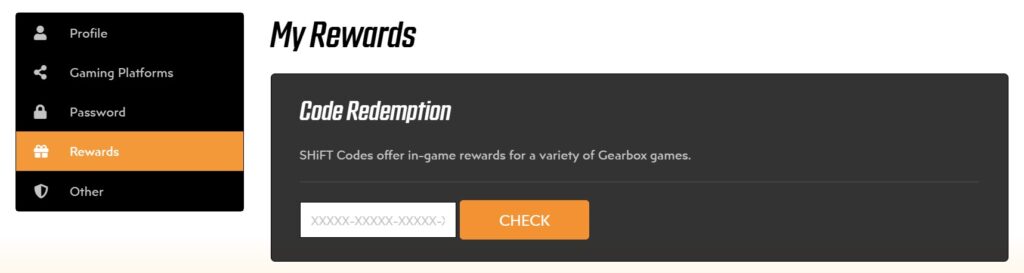
Here’s how to quickly redeem your codes via the Shift website:
- Log in or create a Shift account through Gearbox’s official website.
- Navigate to the Gaming Platforms tab to link the account for the specific platform where you own Borderlands 4.
- While logged in, visit the Rewards tab.
- Enter your 25-digit Shift code into the designated field and select Check.
Alternatively, for direct in-game redemption, simply open the Rewards tab within your Borderlands 4 menu and utilize the Shift interface there.
For more insights and to truly master your Borderlands 4 experience, keep exploring Digital Tech Explorer. Our mission is to help developers and tech enthusiasts stay ahead of trends and make informed decisions, whether it’s optimizing your gameplay or enhancing your coding skills!