
The Asus ProArt Case PA401 immediately captures attention with its fantastic aesthetics and sleek design, thoughtfully concealing a host of tactile and genuinely useful features. While primarily marketed towards professional creators, this classy PC chassis holds broad appeal for anyone contemplating their next build. However, as we at Digital Tech Explorer delve into its capabilities through thorough research and real-world testing, it’s clear that this case comes with specific considerations, particularly regarding cooling support and component compatibility, which are crucial for making an informed decision.
Design Aesthetics
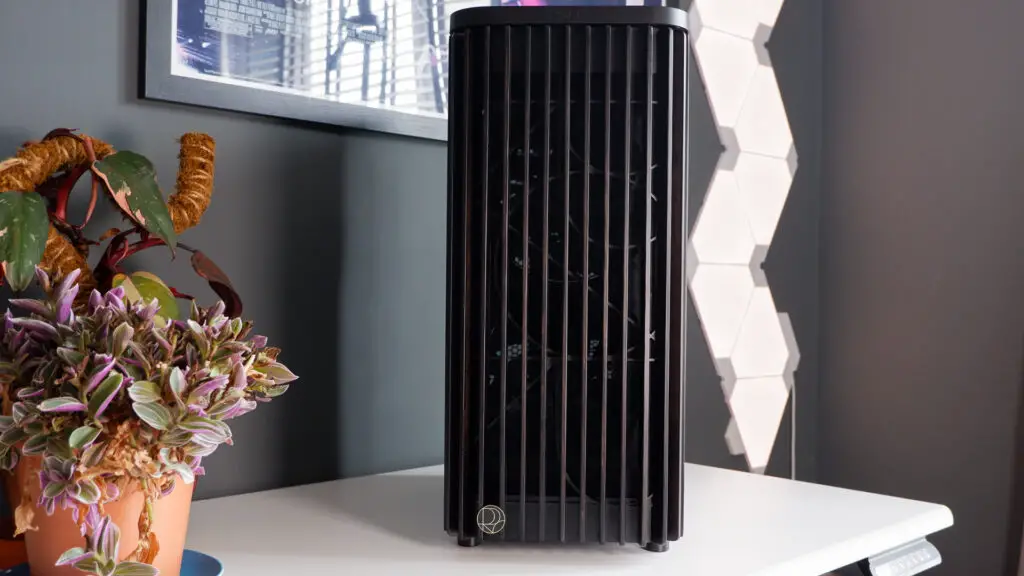
The undeniable allure of the PA401 lies in its distinct use of real wood — each slat gracing the front intake is crafted from sustainably sourced ash with a glossy finish. While this sheen can make the grain less pronounced than in other wood-accented cases, at first glance appearing almost like plastic, the overall understated wood effect harmonizes perfectly with the case’s refined and compact design. TechTalesLeo appreciates how subtle details, such as the ProArt logo visible on the PSU shroud through the tinted tempered glass and the inspiring mantra “Power Up Your Imagination” etched on the upper edge, collectively contribute to its unique, if slightly aspirational, charm. This thoughtful integration of elements ensures that despite its simplicity, the PA401 genuinely stands out for its refined, smaller touches.
Technical Specifications and Compatibility
Despite its compact footprint, the PA401 provides ample room for an ATX motherboard, ensuring you won’t need to compromise on core components. Its dimensions of 412 x 225 x 503 mm offer versatility for placement on or under most desks. However, a deeper dive into its specifications, crucial for any tech enthusiast making an informed decision, reveals certain limitations when aiming for the most powerful hardware on the market, a common consideration for Digital Tech Explorer readers.
| Feature | Specification |
|---|---|
| Dimensions | 412 x 225 x 503 mm |
| Motherboard Support | ATX |
| Radiator Support | Up to 240 mm (top, front) |
| Fan Support | Up to 2x 140 mm (top), up to 2x 160 mm (front) |
| Max CPU Cooler Height | 160 mm |
| Max GPU Length | 315 mm |
| Front I/O | 1 x Headphone / Microphone, 2 x USB 3.2 Gen1, 1 x USB 3.2 Gen 2×2 Type C |
| Storage Bays | 2 x 2.5-inch, 2 x 2.5-inch/3.5-inch combo bay |
A key area where the chassis’s compact design impacts performance is cooling. It can only accommodate a maximum of a 240 mm radiator in either the top or front. While this suffices for many typical builds, it presents challenges for cooling high-TDP processors, such as 13th or 14th Gen Intel chips, potentially limiting future upgrade pathways. Furthermore, a maximum GPU length of 315 mm means the case is quite selective in the graphics cards it can house. Many cutting-edge, high-end models, including anticipated powerhouses like the RTX 5080 or RTX 5090, will simply be too long. Interestingly, one of the few high-performance options that fits snugly is Asus’s own ProArt RTX 5080, a fitting synergy for a ProArt-branded case.
Tactile Features and Ease of Use
Where the PA401 truly shines in terms of user experience is its incorporation of wonderfully tactile switches and buttons – a testament to thoughtful engineering. On the front panel, a dedicated switch cleverly locks the power button, preventing those frustrating accidental shutdowns. Adjacent to it, a satisfying flip-switch offers seamless control over the integrated fan controller, allowing users to effortlessly toggle between maximum speed and an intelligent automatic curve. The side panels are equally impressive; they release with a simple press of a button located at the rear of the case. The tempered glass side panel button even features its own lock, a practical touch that TechTalesLeo particularly appreciates, as it safeguards against the panel falling out when repositioning the PC. Upon release, the panel doesn’t drop but instead gently opens, allowing for safe removal. Reinstallation is equally intuitive, requiring only a simple alignment of the bottom and a firm push until it clicks securely into place, enhancing everyday usability.
Cable Management and Storage
Even with its relatively straightforward rear layout, the PA401 provides solid cable management solutions. For external peripherals, useful cable management hooks are integrated into the rear, helping maintain a tidy setup. Internally, the approach is more pragmatic than elaborate, utilizing three generously sized Velcro straps to secure cables rather than complex dedicated channels – a functional choice that simplifies the building process. A fan controller, capable of supporting up to five PWM fans, is thoughtfully positioned at the top of the case, streamlining connections to motherboard headers. Storage options include a removable HDD cage situated beside the PSU, though space here can be somewhat snug. Additionally, two dedicated mounting spots for 2.5-inch drives are conveniently located on the rear of the motherboard tray, offering flexible storage configurations for builders looking to optimize their setup.
Cooling Performance and Airflow
Out of the box, Asus equips the PA401 with a robust trio of fans: two 160 mm intake fans positioned at the front and a single 120 mm exhaust fan at the rear. While these ProArt-branded fans are inherently capable, our extensive testing at Digital Tech Explorer revealed a significant bottleneck in their performance due to the case’s distinctive front panel design. When the front panel is in place, we observed a massive drop in airflow. Specifically, with the panel removed, the internal airflow measured an impressive 2 m/s; however, with the panel attached, this figure plummeted to a mere 0.7 m/s. This represents one of the most substantial airflow restrictions attributed to a front panel we’ve encountered in our reviews, making it a crucial consideration for any builder contemplating a system with high-heat generating components, aligning with our mission to help users make informed decisions.
In summary, the Asus ProArt Case PA401 presents a compelling blend of style and user-friendliness, making it an appealing choice for many builds. Its elegant design and thoughtful, tactile features truly offer a premium feel. However, as TechTalesLeo’s detailed analysis highlights, its undeniable aesthetic appeal does come with practical compromises. The inherent limitations in cooling support and GPU compatibility mean it falls short for those aiming to build a truly high-end gaming PC or a workstation demanding maximum thermal performance. For builders whose component choices align with these specifications, and who prioritize sophisticated design and premium usability over raw, unbridled power, the PA401 stands as an exceptionally good-looking chassis with clever features, allowing them to power up their imagination within its refined confines.
For those considering this unique case, the ProArt Case PA401 is available for approximately $130 / £120. This price point represents fair value when considering the inclusion of three quality fans, an integrated fan controller, and its distinctively elegant design, making it an intriguing option for tech enthusiasts exploring new build possibilities.