
Our Verdict
As observed in our comprehensive testing at Digital Tech Explorer, the ASRock Phantom Gaming X870 Nova WiFi, while boasting ample M.2 slots and USB ports, is fundamentally limited by insufficient PCIe lanes. This prevents all ports from running at full speed simultaneously when fully utilized. Coupled with its somewhat cumbersome M.2 heatsinks, middling performance, and a relatively high price point, this motherboard primarily caters to a niche audience requiring extensive SSD storage and willing to manage its inherent compromises.
For
- Five M.2 slots
- Two USB4 ports
- WiFi 7
- Cool VRMs
Against
- Not enough PCIe lanes for all the ports and slots
- Weak cooling for Gen5 SSDs
- Most M.2 heatsinks aren’t quick-release
- A bit pricey
For more than 20 years, ASRock has been churning out motherboards for just about every possible PC user and scenario. They were all very barebones and functional, though, and it wasn’t until 2010 that it specifically targeted the gaming sector, with a collaboration with esports player Fatal1ty. Fast forward to 2019, and ASRock broadened its gaming appeal with the first of its Phantom Gaming series of motherboards.
As a tech enthusiast and storyteller for Digital Tech Explorer, I had high hopes for ASRock’s claims that their Phantom Gaming series works “closely with partners to fine-tune the products, and to ensure every product can deliver outstanding gaming experience.” However, my in-depth analysis of the X870 Nova WiFi reveals it falls short of both fine-tuning and delivering that promised outstanding gaming experience.
Don’t get me wrong: it’s not a bad motherboard. It’s just that it’s hampered by a number of compromises, middling performance, and a price tag that’s a touch too high in today’s competitive market.
ASRock Phantom Gaming X870 Nova WiFi Specifications
To provide a clear overview for our readers at Digital Tech Explorer, here’s a breakdown of the ASRock Phantom Gaming X870 Nova WiFi’s key specifications:
| Feature | Specification |
|---|---|
| Socket | AMD AM5 |
| Chipset | AMD X870 |
| CPU Compatibility | AMD Ryzen 7000, 8000, 9000-series desktop |
| Form Factor | ATX |
| Memory Support | DDR5-4800 to DDR5-8400+ (OC), up to 256 GB |
| Storage | 5x M.2, 2x SATA |
| USB (Rear) | 2x USB4 Type-C 40 Gbps, 2x USB 3.2 Type-A 10 Gbps, 3x USB 3.2 Type-A 5 Gbps, 4x USB 2.0 |
| Display | 1x HDMI 2.1, 2x DisplayPort via USB4 |
| Networking | Realtek 5 Gbps LAN, Wi-Fi 7, Bluetooth 5.4 |
| Audio | Realtek ALC4082 |
| Price (Current Retail) | $280 / £247 |
ASRock initially set the Phantom Gaming X870 Nova‘s MSRP at $300 (or £280), but we’ve already seen it reduced to around $280 / £247 at various retailers. While any reduction is welcome, as TechTalesLeo, I believe the current price still doesn’t quite align with the overall value proposition, especially given the compromises detailed below.
Connectivity and PCIe Lane Limitations
The problem is that what looks great on paper doesn’t translate into a dropped jaw when experienced first-hand. This is especially true of the main feature of ASRock’s Nova models: a mountain of M.2 slots for SSDs.
There are five M.2 slots in total: two Gen5, two Gen4, and one Gen3. Sounds okay, yes? Well, that fifth PCIe 3.0 slot only uses two PCIe lanes, so not only is it two generations old, it’s also half the speed. Oh, and you’ll lose the two SATA ports if you do use it.
Then, if you install any kind of SSD in the second M.2 slot and use either of the two USB4 ports on the rear IO panel, both systems will run at half speed. You can override this in the UEFI/BIOS, so that the M.2 slot is fully 4x, but that will completely disable the USB4 ports.
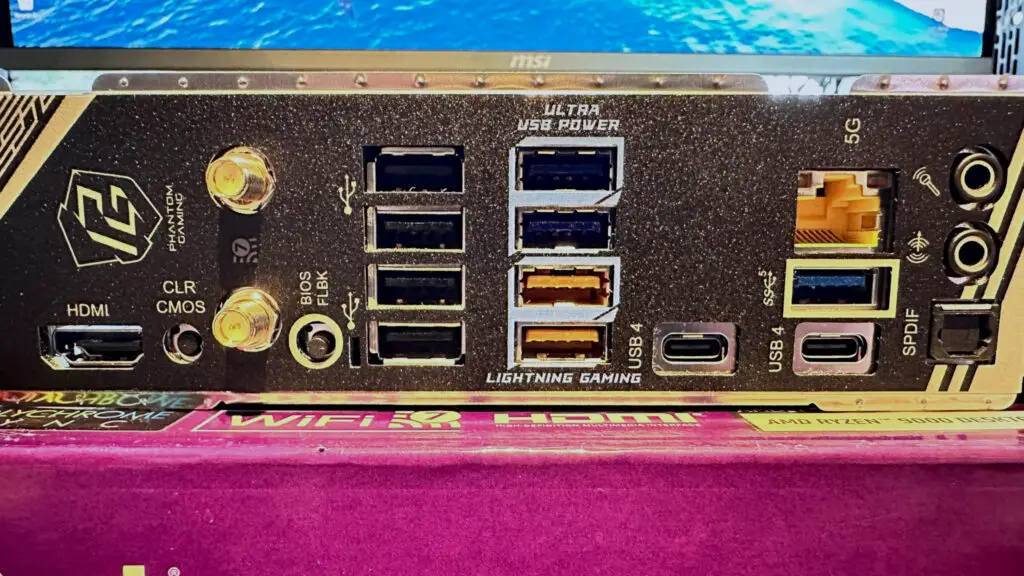
Finally, if you stick an SSD into the second Gen4 slot, the x16 PCI Express slot at the bottom of the motherboard will…you guessed it…run at half speed. Given that it’s electrically an x4 slot to begin with, that leaves you with just two PCIe lanes. Fine for something like a sound card, but not so good if you planned on setting up the X870 Nova in a dual-GPU AI rig.
It’s a similar situation with the rest of the rear IO panel’s sockets. While there are 11 USB ports in total, only four of them are really fast: the two USB4 and the two yellow ones (40 Gbps and 10 Gbps, respectively). The rest are pretty basic, 5 Gbps in speed or USB 2.0, which is really only fast enough for mice and keyboards.
This intricate web of limitations, as thoroughly researched by Digital Tech Explorer, stems from the finite number of PCI Express lanes provided by AMD Ryzen processors and the X870 chipset. Essentially, every PCIe slot, M.2 socket, SATA connection, and USB port must share these lanes, resulting in insufficient bandwidth to ensure all components can operate at their maximum theoretical speeds concurrently.
M.2 Heatsink Design and Board Features
While we’re on the subject of the M.2 slots, it’s worth noting that only the primary slot between the CPU and top PCIe slot has a quick-release heatsink and SSD mounting system. It’s only one of two M.2 slots that has a thermal pad on the motherboard itself.
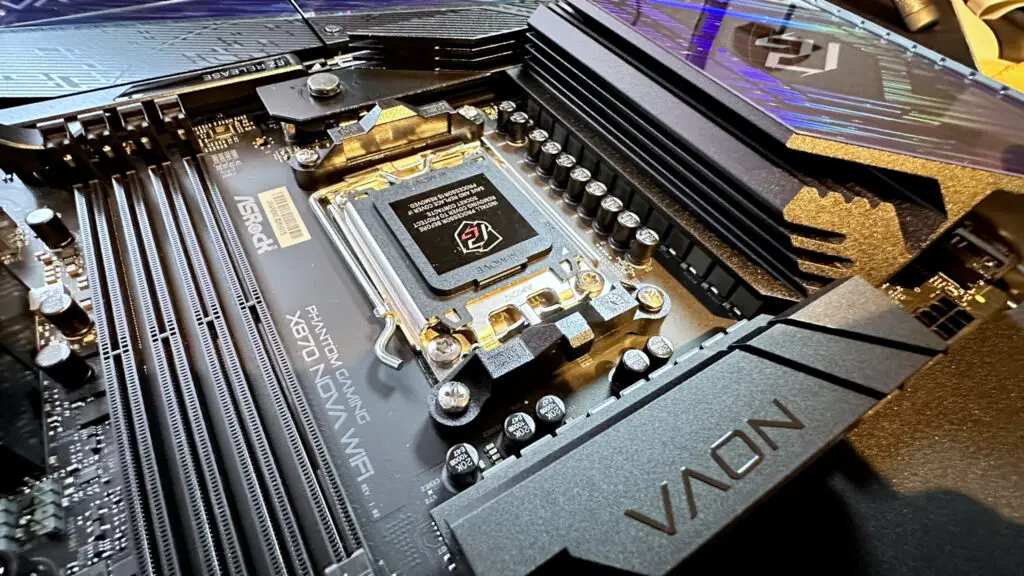
The two Gen4 and sole Gen3 slots have traditional heatsinks that require nimble fingers and a precision screwdriver to remove and reinstall them. At least, they all have quick-release mounting systems for SSDs, though if you plan on fitting anything other than 2280-sized drives, you’ll be out of luck, as that’s the only size the motherboard supports.
The rest of the Phantom Gaming X870 Nova‘s niceties include a board-mounted power button and a BIOS code LED display, both of which are useful for testers like me, but also handy for that initial boot-up test when building a gaming rig. There are plenty of fan headers, though they’re not located very well and configuring them in the UEFI is very clunky.
The one thing that did catch my eye (and hands) with the ASRock Phantom Gaming X870 Nova WiFi is just how solid it feels and how good it looks, under a certain light. There is a strip of LEDs along the bottom edge of the board but none anywhere else, so the aesthetics aren’t due to them: it’s the coating on the M.2 heatsinks that’s responsible for the pretty looks.
Around the back of the motherboard, there’s a very large slab of steel, there to prevent any possible flexing of the board when fitted with a massive graphics card. I do wish more manufacturers would do this because the X870 Nova feels very sturdy. It does make it rather heavy, of course, but at least you get a sense of quality to it all.
Benchmarks and Performance
To ensure thorough and transparent reporting, a cornerstone of Digital Tech Explorer’s mission, our testing for the ASRock X870 Nova WiFi utilized the following PC Gamer test rig configuration:
| Component | Specification |
|---|---|
| CPU | AMD Ryzen 9 9900X |
| Cooler | Asus ROG Strix LC III 360 |
| RAM | 32 GB Lexar Thor OC DDR5-6000 |
| GPU | Zotac GeForce RTX 4070 |
| Storage | 2 TB Corsair MP700 |
| PSU | Thermaltalk ToughPower PF3 1050 W |
| OS | Windows 11 25H2 |
| Chassis | Open platform |
| Monitor | Acer XB280HK |
Since AMD launched its Ryzen 9000-series of processors last year, relevant motherboards, Windows, and AMD’s drivers have all undergone a wealth of updates to improve power management, thread scheduling, and RAM compatibility. For the performance tests of the ASRock X870 Nova, I used its latest 3.50 BIOS, which incorporates AMD’s most recent microcodes for the CPU.
Theoretically, there should be no difference between any AM5-socket motherboard if one uses the same hardware, but due to the constant nature of firmware and software updates, you will always see some disparities between motherboards tested a few months ago and anything brand new.
But even accounting for that, the X870 Nova WiFI is rather underwhelming in our gaming benchmarks. It’s possible that Microsoft’s latest 25H2 update to Windows 11 is responsible for part of the performance deficiency, but I suspect that it’s more to do with ASRock being very conservative with its CPU and RAM settings.
This conservative approach likely stems from ASRock’s past issues with CPU failures on some of its motherboards. While it’s challenging for any reviewer to conclusively confirm a complete resolution in a limited timeframe, our commitment at Digital Tech Explorer to delivering insightful tech stories means we must highlight this. A cautious buyer, making informed decisions, should certainly consider this history when evaluating an ASRock AM5 motherboard.
So, not great, but not bad, at gaming. Fortunately, whatever ASRock is doing to affect our game benchmarks, it has no impact on Cinebench, Blender, and 7zip. All of the above results are perfectly normal for a Ryzen 9 9900X, and I repeated all of those tests multiple times to confirm the figures.
As TechTalesLeo, I note that while 7zip is heavily influenced by RAM speeds and timings, its solid performance here suggests the Phantom Gaming X870 Nova could be a viable option for a content creation rig—provided, of course, that such a setup limits itself to just a couple of SSDs.
On the plus side, even when the Ryzen 9 9900X was pulling its maximum power consumption of 162 W for well over 10 minutes, the voltage regulator modules (VRMs) barely got hot. With a peak temperature of just 50 °C, it’s clear that ASRock has installed a very solid heatsink and thermal pad solution on the X870 Nova.
Alas, the same can’t be said about the M.2 slots. The primary slot only just about copes with a PCIe 5.0 SSD, and at a peak of 78 °C, that’s close to hitting the thermal limit of the Corsair drive used. However, if you stick to using a Gen4 SSD or buy one of the very latest Gen5 SSDs (which do run a lot cooler than the first generation of PCIe 5.0 drives), then you should be fine.
I did find that the second Gen5 M.2 slot performed a little better, in terms of thermals, and that’s probably because there’s a wider area of metal to dissipate heat from. We’re only talking about a handful of degrees, though, and should you fit another SSD under that heatsink, that difference will surely evaporate.
✅ You want lots of connectivity options: Five M.2 slots, 11 rear USB ports, and WiFi 7 all give the X870 Nova a sparkling feature set.
❌ You don’t want to compromise on speed: If you do install a storage drive in every M.2 slot, some will run slower than normal, as will the USB4 ports and bottom PCIe slot, and you’ll lose the SATA ports.
Having explored its strengths and weaknesses, my conclusion as TechTalesLeo for Digital Tech Explorer is unlikely to surprise you. The ASRock Phantom Gaming X870 Nova WiFi isn’t a motherboard designed for the average PC enthusiast. Instead, it carves out a very specific, niche appeal.
Its true purpose emerges for those who absolutely require an abundance of M.2 SSDs and are prepared to forgo SATA HDDs or full-speed USB4 connectivity when pushing its limits. However, for maximum, uncompromised storage versatility, an X870E motherboard might generally offer a better, albeit often similarly flawed, experience.
Considering its modest gaming performance and the lingering concerns around ASRock’s prior CPU failure issues (which Digital Tech Explorer encourages all users to research thoroughly), it’s hard to recommend the Nova WiFi for dedicated gamers. For a purely gaming-focused build, a more budget-friendly B850 board would undoubtedly offer better value.
Drawing on my extensive experience, as TechTalesLeo, I can attest to the excellence of ASRock’s Phantom Gaming Z790 Nova. I personally use it in one of my Intel test rigs, appreciating its six M.2 slots where only one faces PCIe lane compromises. Crucially, all slots are Gen4 or better, support various SSD sizes, and allow for simultaneous use of all four SATA ports — a stark contrast that highlights the X870 Nova WiFi’s AMD-platform specific challenges.
Ultimately, many of the X870 Nova WiFi’s limitations trace back to the inherent characteristics of AMD’s Ryzen processors and the X870 chipset. Had ASRock opted for the X870E chipset, many of these compromises regarding PCIe lane allocation could have been alleviated, better aligning this motherboard with the Nova range’s unique selling proposition as a true storage powerhouse, even if gaming performance remained similar.